QUESTION IMAGE
Question
an incorrect number format
too narrow column width
a missing lookup function reference
a \division by 0\ error
Identify the visual symptom in the spreadsheet
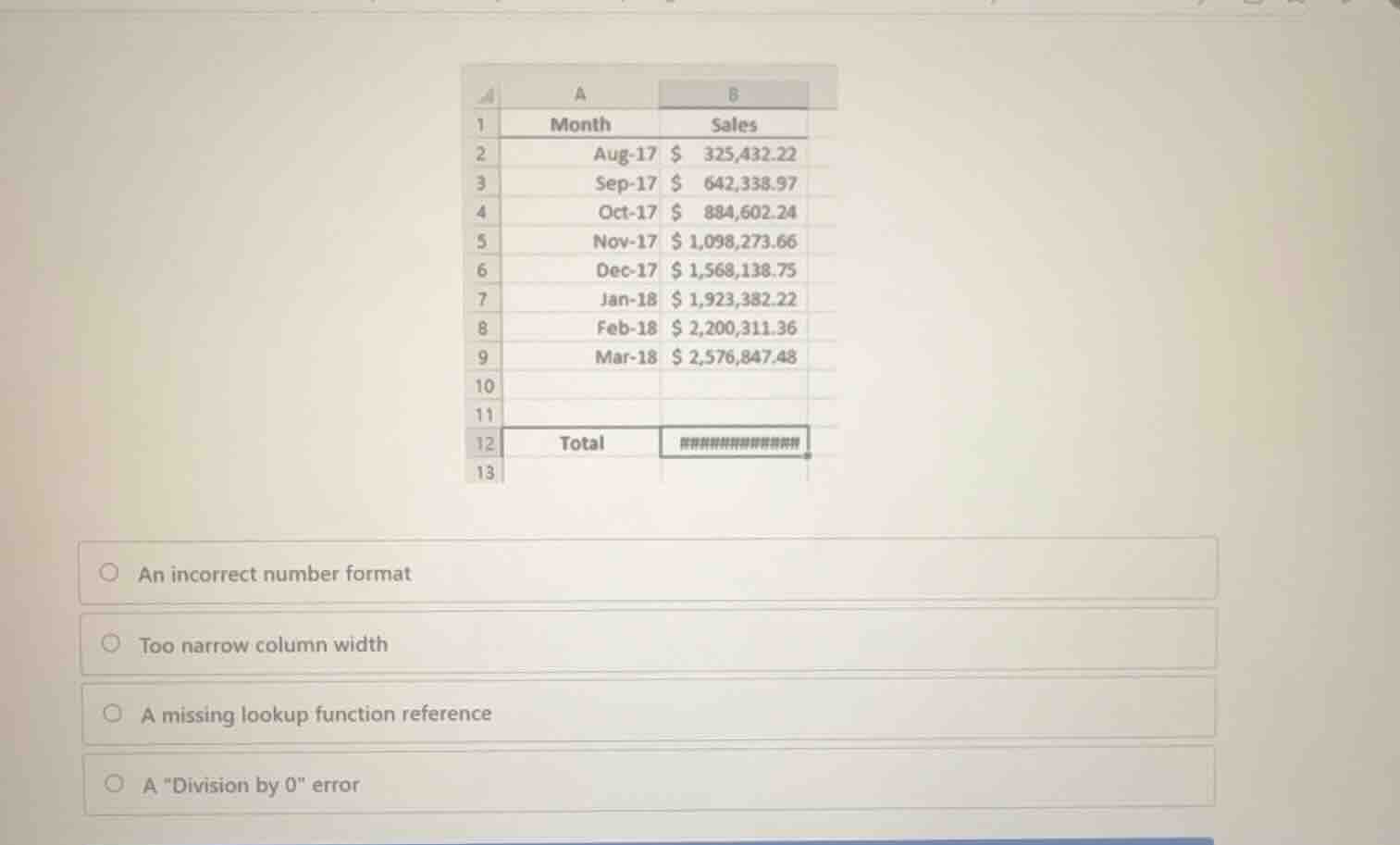
Using the Excel Interface Navigation and Spreadsheet Software Basics knowledge points, we observe cell B12 displays a series of hash symbols ###.
Analyze the cause of the hash symbol display
In spreadsheet software, a cell filled with ### indicates that the column is not wide enough to display the formatted numeric value.
Evaluate the multiple-choice options
We compare this behavior against the given options to find the correct explanation.
- "An incorrect number format" is incorrect because the format itself is valid, but the column width is insufficient.
- "Too narrow column width" is correct because widening column B will display the numeric total.
- "A missing lookup function reference" is incorrect because that would result in a
#N/Aor#REF!error. - "A \"Division by 0\" error" is incorrect because that would display as
#DIV/0!.

Snap & solve any problem in the app
Get step-by-step solutions on Sovi AI
Photo-based solutions with guided steps
Explore more problems and detailed explanations
- An incorrect number format
- Too narrow column width (Correct answer)
- A missing lookup function reference
- A "Division by 0" error