Sovi.AI - AI Math Tutor

Scan to solve math questions

QUESTION IMAGE

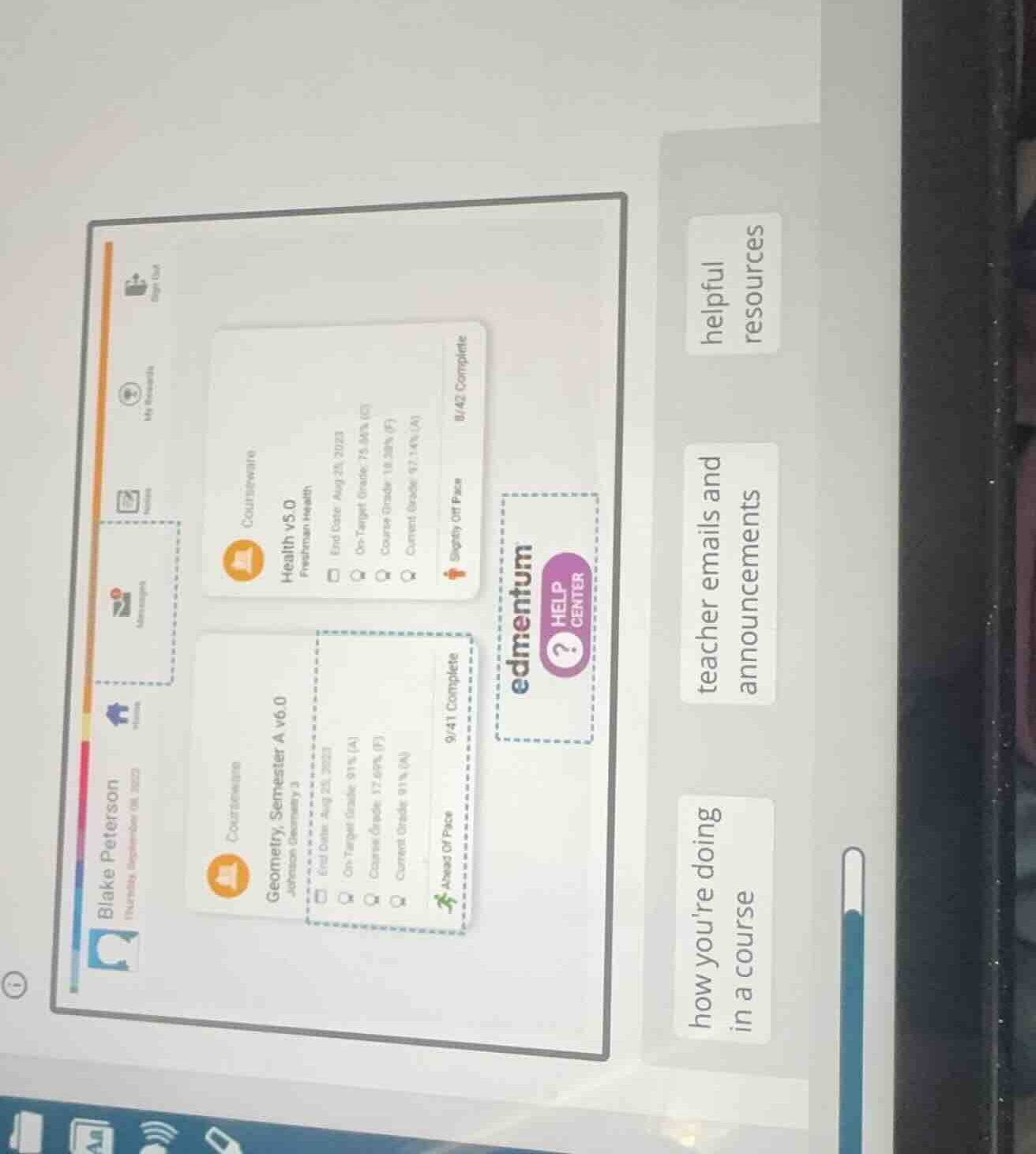
how youre doing in a course teacher emails and announcements helpful re…

Question

how youre doing in a course
teacher emails and announcements
helpful resources
edmentum help center
blake peterson
geometry, semester a v6.0
health v5.0

Explanation:

Response

<pre_analysis>
{
"quality": "clear",
"question_count": 1,
"skills_matched": [
"direct_cot",
"multiple_choice_formatter",
"explain_then_answer",
"tutor"
],
"needs_drawing": false,
"concepts_used": [
"Task Status Interpretation",
"Data Extraction"
],
"new_concepts": [
"Dashboard Navigation",
"Academic Progress Tracking"
],
"current_concepts": [
"Task Status Interpretation",
"Data Extraction",
"Dashboard Navigation",
"Academic Progress Tracking"
]
}
</pre_analysis>

<reasoning>

Identify the user interface elements

The image displays an Edmentum student dashboard for a student named Blake Peterson. On the left, there are course cards showing progress, grades, and pace. On the right, there are three large buttons/labels: "how you're doing in a course", "teacher emails and announcements", and "helpful resources".

Analyze the highlighted dashboard sections

There are dashed blue selection boxes highlighting specific areas on the dashboard:

  1. A dashed box around the "Geometry, Semester A v6.0" course card, specifically highlighting the course progress, grades, and pace indicators ("Ahead of Pace", "9/41 Complete").
  2. A dashed box around the "Messages" icon on the left-hand navigation bar.
  3. A dashed box around the "edmentum HELP CENTER" button in the middle.

Match the highlighted areas to the options

We need to match the highlighted areas to the three categories on the right:

  • The highlighted course card details ("Geometry, Semester A v6.0" showing grades and completion status) directly show how you're doing in a course.
  • The highlighted "Messages" icon on the left navigation bar is where you would find teacher emails and announcements.
  • The highlighted "edmentum HELP CENTER" button is a destination for helpful resources.

Determine the correct association

The question asks to match or identify what the highlighted sections represent. Based on the visual indicators:

  • The dashed box around the Geometry course card details corresponds to "how you're doing in a course".
  • The dashed box around the Messages icon corresponds to "teacher emails and announcements".
  • The dashed box around the Help Center corresponds to "helpful resources".

</reasoning>

<answer>

Question 1

<mcq-correct>(A) The highlighted Geometry course card details show "how you're doing in a course", the highlighted Messages icon shows "teacher emails and announcements", and the highlighted Help Center shows "helpful resources".</mcq-correct>
<mcq-option>(B) The highlighted Geometry course card details show "helpful resources", the highlighted Messages icon shows "how you're doing in a course", and the highlighted Help Center shows "teacher emails and announcements".</mcq-option>
<mcq-option>(C) The highlighted Geometry course card details show "teacher emails and announcements", the highlighted Messages icon shows "helpful resources", and the highlighted Help Center shows "how you're doing in a course".</mcq-option>
</answer>

<post_analysis>
{
"subject": "Others",
"question_type": "Multiple Choice",
"knowledge_point": [
"Others",
"Others",
"Dashboard Navigation"
]
}
</post_analysis>

Answer:

<pre_analysis>
{
"quality": "clear",
"question_count": 1,
"skills_matched": [
"direct_cot",
"multiple_choice_formatter",
"explain_then_answer",
"tutor"
],
"needs_drawing": false,
"concepts_used": [
"Task Status Interpretation",
"Data Extraction"
],
"new_concepts": [
"Dashboard Navigation",
"Academic Progress Tracking"
],
"current_concepts": [
"Task Status Interpretation",
"Data Extraction",
"Dashboard Navigation",
"Academic Progress Tracking"
]
}
</pre_analysis>

<reasoning>

Identify the user interface elements

The image displays an Edmentum student dashboard for a student named Blake Peterson. On the left, there are course cards showing progress, grades, and pace. On the right, there are three large buttons/labels: "how you're doing in a course", "teacher emails and announcements", and "helpful resources".

Analyze the highlighted dashboard sections

There are dashed blue selection boxes highlighting specific areas on the dashboard:

  1. A dashed box around the "Geometry, Semester A v6.0" course card, specifically highlighting the course progress, grades, and pace indicators ("Ahead of Pace", "9/41 Complete").
  2. A dashed box around the "Messages" icon on the left-hand navigation bar.
  3. A dashed box around the "edmentum HELP CENTER" button in the middle.

Match the highlighted areas to the options

We need to match the highlighted areas to the three categories on the right:

  • The highlighted course card details ("Geometry, Semester A v6.0" showing grades and completion status) directly show how you're doing in a course.
  • The highlighted "Messages" icon on the left navigation bar is where you would find teacher emails and announcements.
  • The highlighted "edmentum HELP CENTER" button is a destination for helpful resources.

Determine the correct association

The question asks to match or identify what the highlighted sections represent. Based on the visual indicators:

  • The dashed box around the Geometry course card details corresponds to "how you're doing in a course".
  • The dashed box around the Messages icon corresponds to "teacher emails and announcements".
  • The dashed box around the Help Center corresponds to "helpful resources".

</reasoning>

<answer>

Question 1

<mcq-correct>(A) The highlighted Geometry course card details show "how you're doing in a course", the highlighted Messages icon shows "teacher emails and announcements", and the highlighted Help Center shows "helpful resources".</mcq-correct>
<mcq-option>(B) The highlighted Geometry course card details show "helpful resources", the highlighted Messages icon shows "how you're doing in a course", and the highlighted Help Center shows "teacher emails and announcements".</mcq-option>
<mcq-option>(C) The highlighted Geometry course card details show "teacher emails and announcements", the highlighted Messages icon shows "helpful resources", and the highlighted Help Center shows "how you're doing in a course".</mcq-option>
</answer>

<post_analysis>
{
"subject": "Others",
"question_type": "Multiple Choice",
"knowledge_point": [
"Others",
"Others",
"Dashboard Navigation"
]
}
</post_analysis>