QUESTION IMAGE
Question
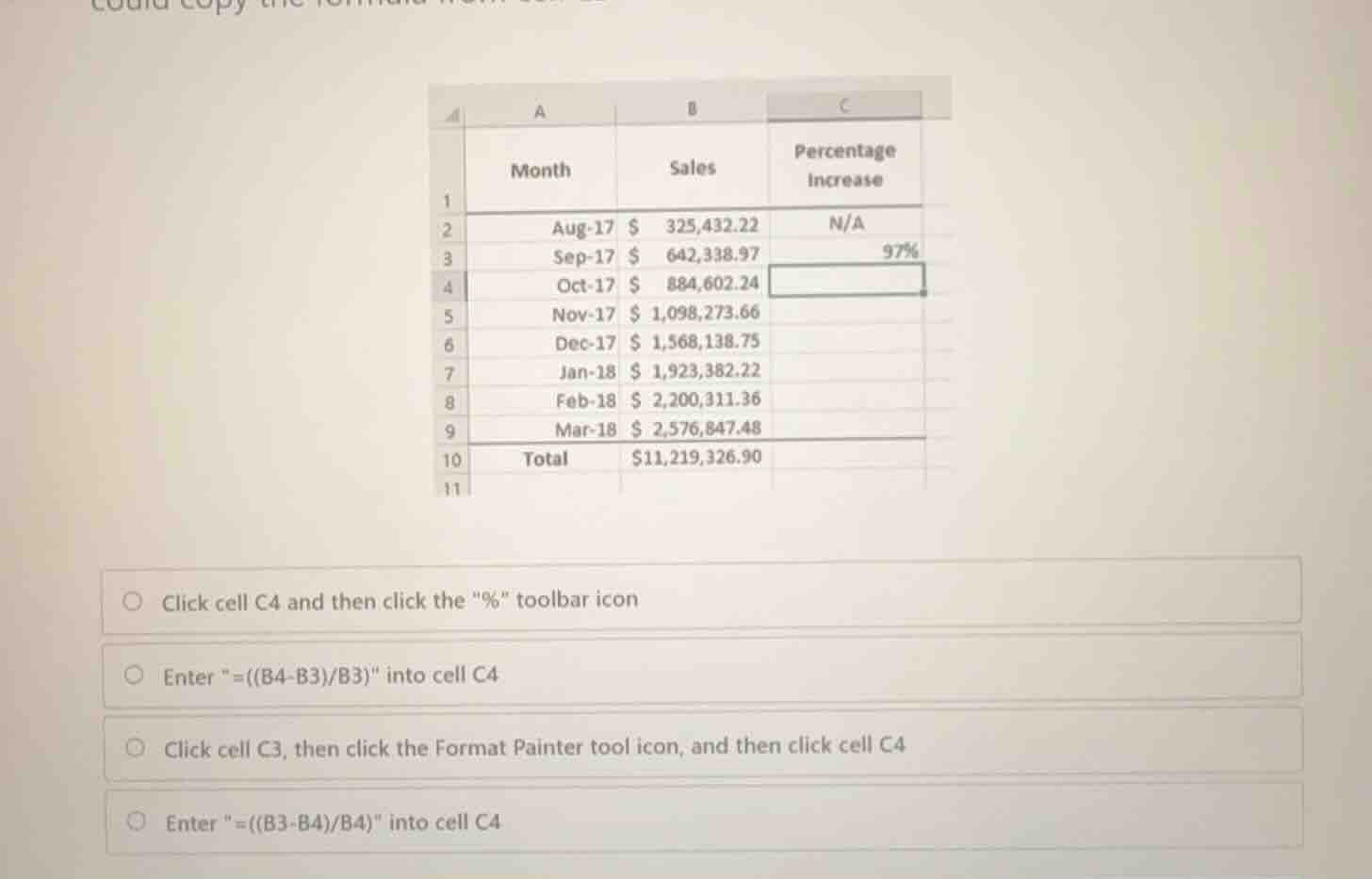
could copy the formula from cell c3...
month sales percentage increase
1
2 aug-17 $ 325,432.22 n/a
3 sep-17 $ 642,338.97 97%
4 oct-17 $ 884,602.24
5 nov-17 $ 1,098,273.66
6 dec-17 $ 1,568,138.75
7 jan-18 $ 1,923,382.22
8 feb-18 $ 2,200,311.36
9 mar-18 $ 2,576,847.48
10 total $11,219,326.90
11
click cell c4 and then click the \%\ toolbar icon
enter \=((b4-b3)/b3)\ into cell c4
click cell c3, then click the format painter tool icon, and then click cell c4
enter \=((b3-b4)/b4)\ into cell c4
Identify the target cell and goal
Using the Spreadsheet Formulas knowledge point
The goal is to calculate the percentage increase in sales for October 2017 (row 4) compared to September 2017 (row 3) in cell C4.
Determine the percentage increase formula
Using the Spreadsheet Formulas knowledge point
For October 2017 (cell B4) compared to September 2017 (cell B3):
Match with spreadsheet syntax
Using the Spreadsheet Formulas knowledge point
In Excel, formulas must begin with an equals sign \("="\). Therefore, the correct formula to enter in cell C4 is:

Snap & solve any problem in the app
Get step-by-step solutions on Sovi AI
Photo-based solutions with guided steps
Explore more problems and detailed explanations
- Click cell C4 and then click the "%" toolbar icon
- Enter "=((B4-B3)/B3)" into cell C4 (Correct answer)
- Click cell C3, then click the Format Painter tool icon, and then click cell C4
- Enter "=((B3-B4)/B4)" into cell C4