QUESTION IMAGE
Question
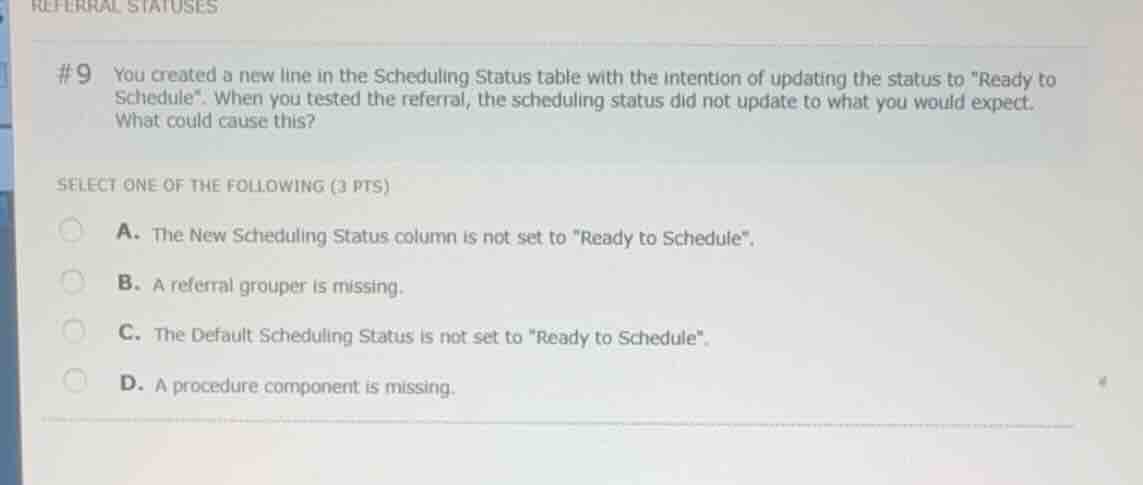
#9 you created a new line in the scheduling status table with the intention of updating the status to
eady to schedule\. when you tested the referral, the scheduling status did not update to what you would expect. what could cause this?
select one of the following (3 pts)
a. the new scheduling status column is not set to
eady to schedule\.
b. a referral grouper is missing.
c. the default scheduling status is not set to
eady to schedule\.
d. a procedure component is missing.
Analyze the configuration of the Scheduling Status table
The scenario describes adding a new line to the Scheduling Status table (often part of the Auto Status Assignment Table configuration in Epic Referrals) to update a referral's scheduling status to "Ready to Schedule". When a new line is evaluated, the system maps specific criteria to a target status.
Identify the root cause of the incorrect status update
If the test referral matches the criteria of the new line but does not update to "Ready to Schedule", the most direct configuration error on that specific line is that the "New Scheduling Status" column for that row was not actually set to "Ready to Schedule".
Evaluate the multiple-choice options
- A. The New Scheduling Status column is not set to "Ready to Schedule". This directly explains why the status did not update to the expected value when the line was triggered.
- B. A referral grouper is missing. Groupers group referrals but do not directly prevent a configured status mapping line from executing if the line itself is evaluated.
- C. The Default Scheduling Status is not set to "Ready to Schedule". The default status is a fallback and would not prevent a specific table line from working if configured correctly.
- D. A procedure component is missing. This is unrelated to the basic status mapping logic of the table.

Snap & solve any problem in the app
Get step-by-step solutions on Sovi AI
Photo-based solutions with guided steps
Explore more problems and detailed explanations
- A. The New Scheduling Status column is not set to "Ready to Schedule". (Correct answer)
- B. A referral grouper is missing.
- C. The Default Scheduling Status is not set to "Ready to Schedule".
- D. A procedure component is missing.