QUESTION IMAGE
Question
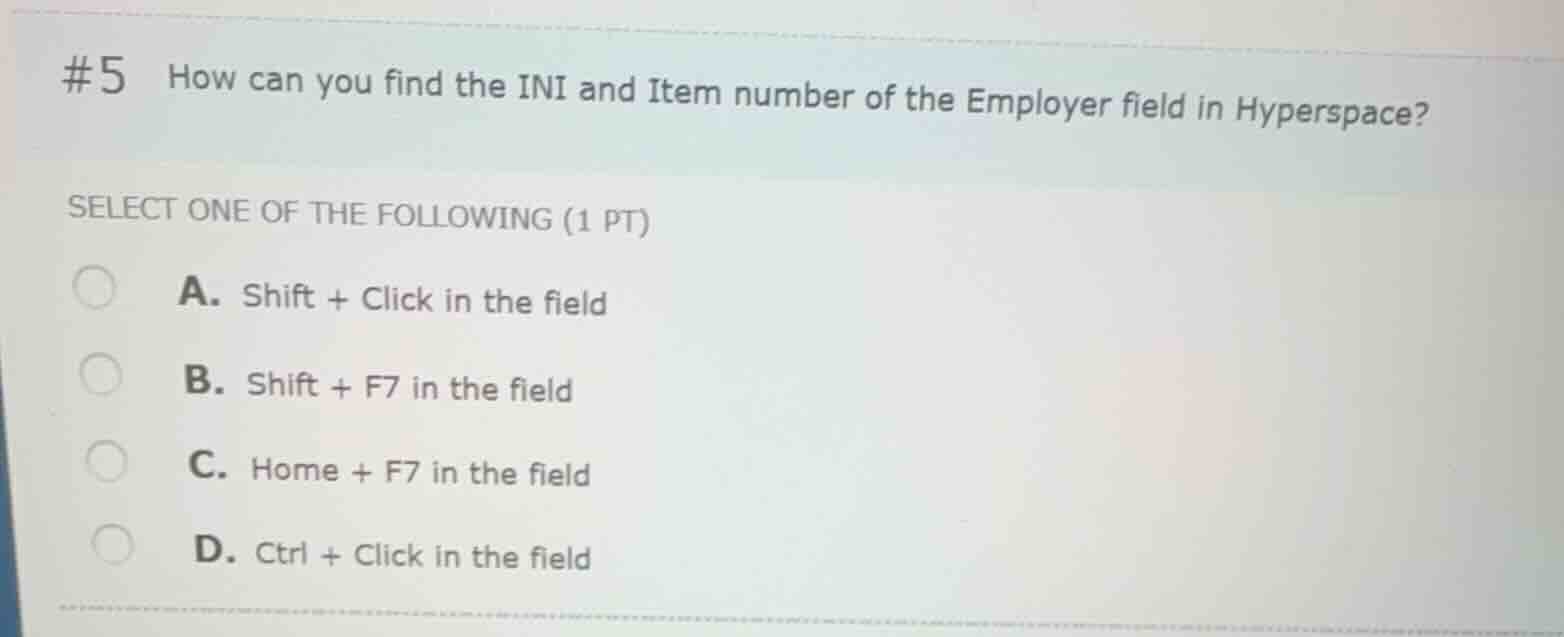
#5 how can you find the ini and item number of the employer field in hyperspace?
select one of the following (1 pt)
a. shift + click in the field
b. shift + f7 in the field
c. home + f7 in the field
d. ctrl + click in the field
Identify the standard Epic Hyperspace shortcut for field information
In Epic Hyperspace, to find the database representation (the INI and Item number) of a specific field, the standard system shortcut is to click into the field and press Ctrl + Click (or use Ctrl + Left Click).
Evaluate the given options
- A. Shift + Click in the field: Incorrect.
- B. Shift + F7 in the field: Incorrect (Shift + F7 is used in Text/Mnemonic utility environments, not standard Hyperspace fields).
- C. Home + F7 in the field: Incorrect (Home + F7 is used in Text/Mnemonic utility environments to display field information).
- D. Ctrl + Click in the field: Correct (This is the standard shortcut in Epic Hyperspace to display the XML/Item Information window containing the INI and Item number).

Snap & solve any problem in the app
Get step-by-step solutions on Sovi AI
Photo-based solutions with guided steps
Explore more problems and detailed explanations
- (A) Shift + Click in the field
- (B) Shift + F7 in the field
- (C) Home + F7 in the field
- (D) Ctrl + Click in the field (Correct answer)