Sovi.AI - AI Math Tutor

Scan to solve math questions

QUESTION IMAGE

drag each tutorial feature to its learning purpose. pairs see whether y…

Question

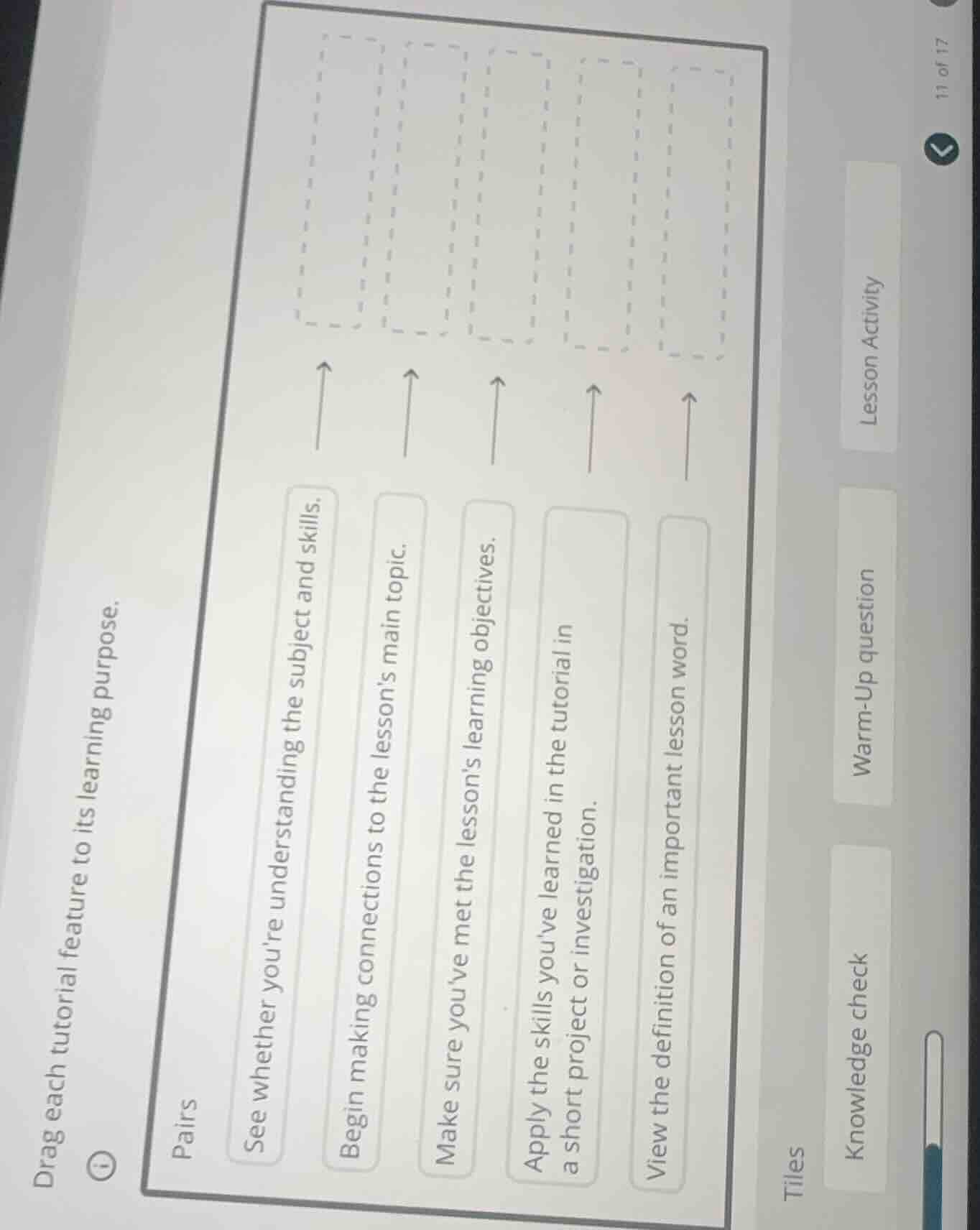
drag each tutorial feature to its learning purpose.

pairs
see whether youre understanding the subject and skills.
begin making connections to the lessons main topic.
make sure youve met the lessons learning objectives.
apply the skills youve learned in the tutorial in a short project or investigation.
view the definition of an important lesson word.

tiles
knowledge check
warm-up question
lesson activity

Explanation:

Response

<pre_analysis>
{
"quality": "clear",
"question_count": 1,
"skills_matched": [
"direct_cot",
"explain_then_answer",
"tutor"
],
"needs_drawing": false,
"concepts_used": [],
"new_concepts": [
"Instructional Design",
"Educational Terminology"
],
"current_concepts": [
"Instructional Design",
"Educational Terminology"
]
}
</pre_analysis>

<reasoning>

Analyze the matching task

The task requires matching each tutorial feature (learning purpose) on the left to its corresponding lesson tile on the right.

Let's analyze the learning purposes (left side):

  1. "See whether you're understanding the subject and skills."
  • This describes checking one's current understanding or knowledge.
  • Matches: Knowledge check
  1. "Begin making connections to the lesson's main topic."
  • This describes an introductory activity designed to prepare students for the main content.
  • Matches: Warm-Up question
  1. "Make sure you've met the lesson's learning objectives."
  • This describes verifying mastery of the objectives at the end of a lesson or section.
  • Matches: Lesson Activity (or potentially another tile, let's look at all options first). Let's re-evaluate:
  • "Lesson Activity" usually refers to the core practice or project.
  • Let's look at the available tiles on the right: "Knowledge check", "Warm-Up question", "Lesson Activity".
  • Let's look at the remaining purposes:
  • "Apply the skills you've learned in the tutorial in a short project or investigation." -> This perfectly matches Lesson Activity.
  • "View the definition of an important lesson word." -> This matches a glossary or vocabulary feature (not shown as a tile, or perhaps some tiles are cut off/not visible, but we must match the visible ones).
  • Let's re-examine the visible tiles: "Knowledge check", "Warm-Up question", "Lesson Activity".

Match purposes to tiles

Let's pair each purpose with its most appropriate tile:

  • "See whether you're understanding the subject and skills." $

ightarrow$ Knowledge check

  • "Begin making connections to the lesson's main topic." $

ightarrow$ Warm-Up question

  • "Apply the skills you've learned in the tutorial in a short project or investigation." $

ightarrow$ Lesson Activity
</reasoning>

<answer>
Based on the descriptions and the available tiles, here are the correct matches:

  • See whether you're understanding the subject and skills. $

ightarrow$ Knowledge check

  • Begin making connections to the lesson's main topic. $

ightarrow$ Warm-Up question

  • Apply the skills you've learned in the tutorial in a short project or investigation. $

ightarrow$ Lesson Activity
</answer>

<post_analysis>
{
"subject": "Others",
"question_type": "Free Response",
"knowledge_point": [
"Others",
"Others",
"Educational Terminology"
]
}
</post_analysis>

Answer:

<pre_analysis>
{
"quality": "clear",
"question_count": 1,
"skills_matched": [
"direct_cot",
"explain_then_answer",
"tutor"
],
"needs_drawing": false,
"concepts_used": [],
"new_concepts": [
"Instructional Design",
"Educational Terminology"
],
"current_concepts": [
"Instructional Design",
"Educational Terminology"
]
}
</pre_analysis>

<reasoning>

Analyze the matching task

The task requires matching each tutorial feature (learning purpose) on the left to its corresponding lesson tile on the right.

Let's analyze the learning purposes (left side):

  1. "See whether you're understanding the subject and skills."
  • This describes checking one's current understanding or knowledge.
  • Matches: Knowledge check
  1. "Begin making connections to the lesson's main topic."
  • This describes an introductory activity designed to prepare students for the main content.
  • Matches: Warm-Up question
  1. "Make sure you've met the lesson's learning objectives."
  • This describes verifying mastery of the objectives at the end of a lesson or section.
  • Matches: Lesson Activity (or potentially another tile, let's look at all options first). Let's re-evaluate:
  • "Lesson Activity" usually refers to the core practice or project.
  • Let's look at the available tiles on the right: "Knowledge check", "Warm-Up question", "Lesson Activity".
  • Let's look at the remaining purposes:
  • "Apply the skills you've learned in the tutorial in a short project or investigation." -> This perfectly matches Lesson Activity.
  • "View the definition of an important lesson word." -> This matches a glossary or vocabulary feature (not shown as a tile, or perhaps some tiles are cut off/not visible, but we must match the visible ones).
  • Let's re-examine the visible tiles: "Knowledge check", "Warm-Up question", "Lesson Activity".

Match purposes to tiles

Let's pair each purpose with its most appropriate tile:

  • "See whether you're understanding the subject and skills." $

ightarrow$ Knowledge check

  • "Begin making connections to the lesson's main topic." $

ightarrow$ Warm-Up question

  • "Apply the skills you've learned in the tutorial in a short project or investigation." $

ightarrow$ Lesson Activity
</reasoning>

<answer>
Based on the descriptions and the available tiles, here are the correct matches:

  • See whether you're understanding the subject and skills. $

ightarrow$ Knowledge check

  • Begin making connections to the lesson's main topic. $

ightarrow$ Warm-Up question

  • Apply the skills you've learned in the tutorial in a short project or investigation. $

ightarrow$ Lesson Activity
</answer>

<post_analysis>
{
"subject": "Others",
"question_type": "Free Response",
"knowledge_point": [
"Others",
"Others",
"Educational Terminology"
]
}
</post_analysis>