QUESTION IMAGE
Question
Question was provided via image upload.
Identify the visual elements
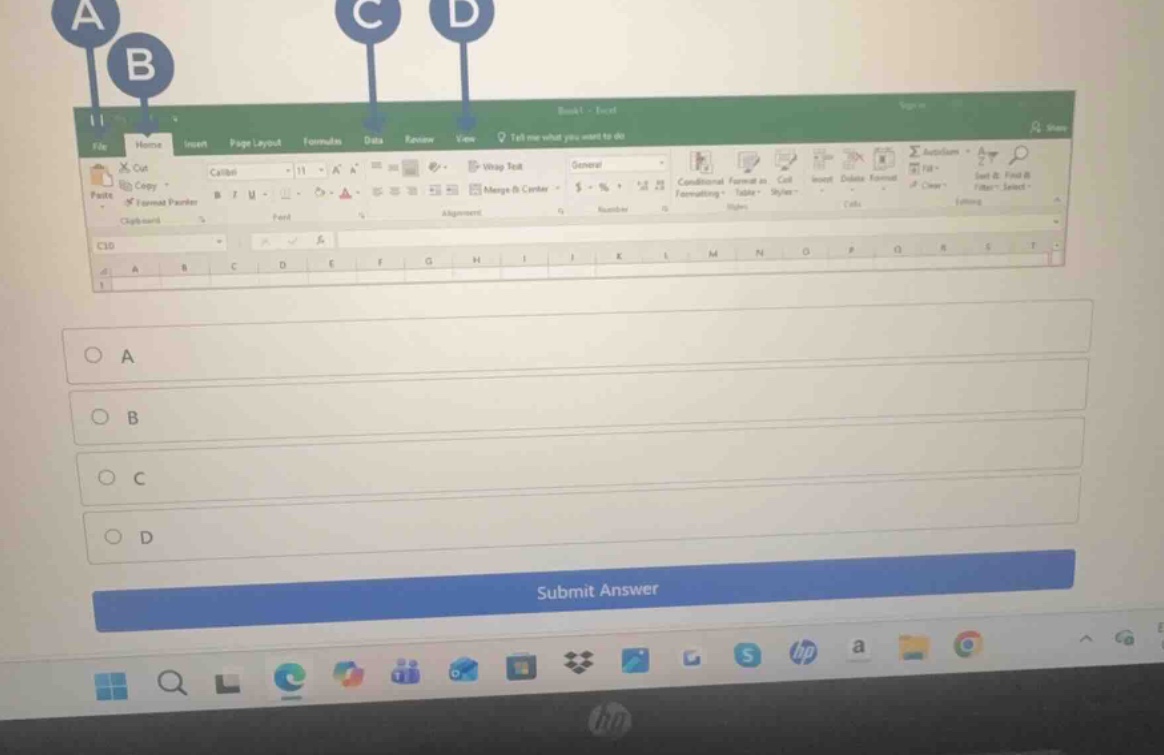
The image displays a Microsoft Excel window interface with four labeled pointers:
- A points to the File tab.
- B points to the Home tab.
- C points to the Data tab.
- D points to the View tab.
Analyze the missing question context
Using Attention to Detail, we observe that the specific question text is not visible in the image. However, in standard computer literacy or spreadsheet software assessments, a question showing these specific pointers typically asks to identify which tab contains a specific command or represents a specific named area of the ribbon interface.
Let's evaluate the most common questions associated with this exact visual setup:
- "Which letter points to the File tab?" -> Answer: A
- "Which letter points to the Home tab?" -> Answer: B
- "Where would you click to open the Backstage view?" -> The Backstage view is accessed via the File tab, which is pointed to by A.
- "Where is the Home tab located?" -> Answer: B
Since the question text is cut off, we must provide a clear, conditional explanation identifying what each letter represents so that the student can select the correct option depending on their specific question prompt. Let's assume the standard identification of the primary tab (File/Backstage view or Home tab) which is most frequently tested. Let's detail each pointer clearly.
- A points to the File tab (Backstage View).
- B points to the Home tab (Default active ribbon tab containing Clipboard, Font, Alignment, Number, Styles, Cells, and Editing groups).
- C points to the Data tab.
- D points to the View tab.

Snap & solve any problem in the app
Get step-by-step solutions on Sovi AI
Photo-based solutions with guided steps
Explore more problems and detailed explanations
Since the specific question text is not visible in the image, here is the identification for each labeled pointer to help you select the correct answer:
- A points to the File tab (used to access the Backstage view, save, open, or print files).
- B points to the Home tab (contains common formatting tools, clipboard options, and cell styles).
- C points to the Data tab (used for importing, filtering, and sorting data).
- D points to the View tab (used to change document views, show/hide gridlines, and zoom).
Please match these descriptions to your specific question prompt to select the correct option:
- (A) File Tab / Backstage View
- (B) Home Tab
- (C) Data Tab
- (D) View Tab