QUESTION IMAGE
Question
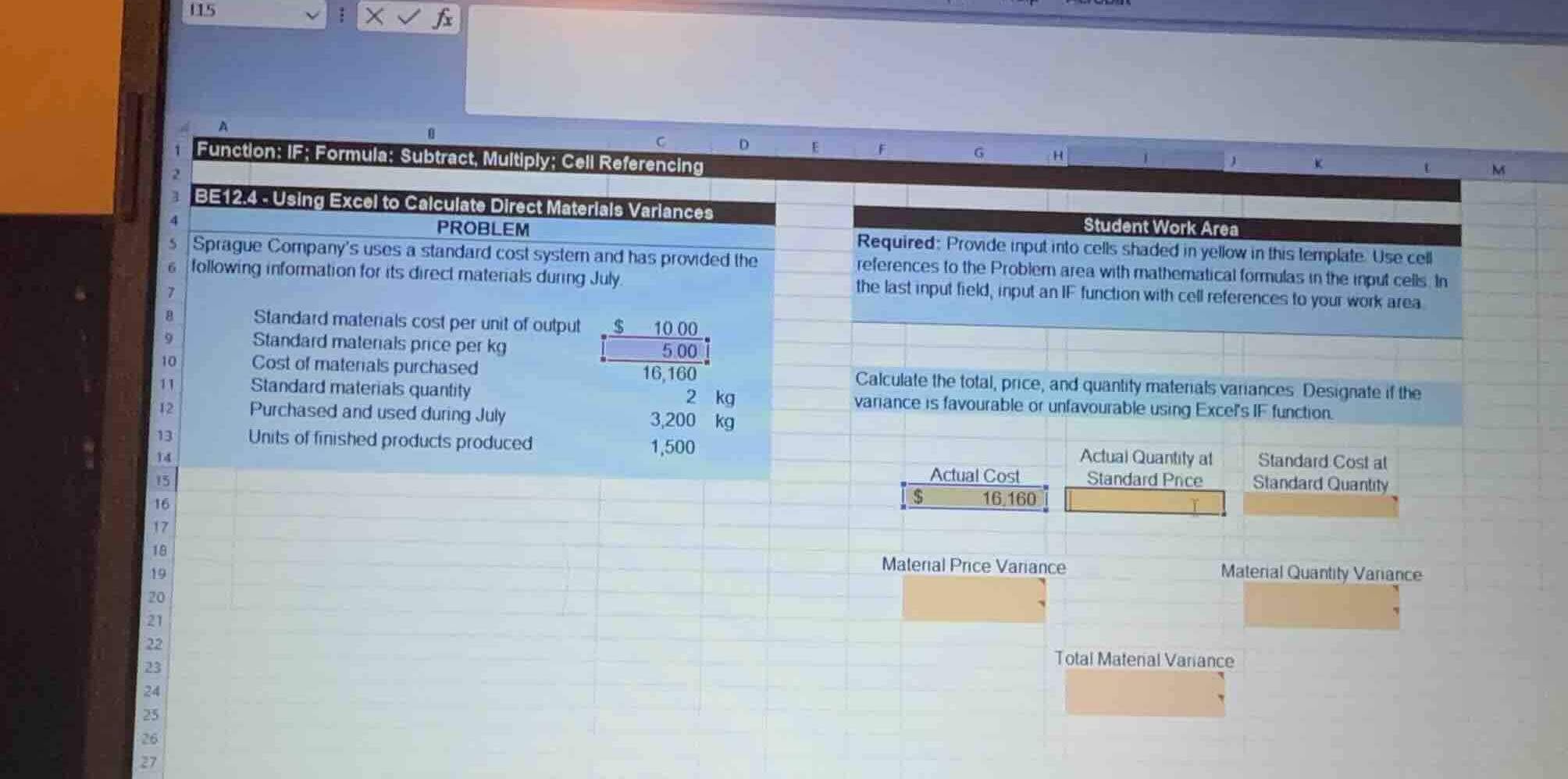
be12.4 - using excel to calculate direct materials variances
problem
sprague companys uses a standard cost system and has provided the following information for its direct materials during july.
standard materials cost per unit of output: $10.00
standard materials price per kg: $5.00
cost of materials purchased: 16,160
standard materials quantity: 2 kg
purchased and used during july: 3,200 kg
units of finished products produced: 1,500
student work area
required: provide input into cells shaded in yellow in this template. use cell references to the problem area with mathematical formulas in the input cells. in the last input field, input an if function with cell references to your work area.
calculate the total, price, and quantity materials variances. designate if the variance is favourable or unfavourable using excels if function.
Identify the given values and cell locations
We first locate the given values in the spreadsheet:
- Standard materials price per kg: \( \$5.00 \) in cell
C9 - Cost of materials purchased (Actual Cost): \( \$16,160 \) in cell
C10 - Standard materials quantity per unit: \( 2\text{ kg} \) in cell
C11 - Actual quantity purchased and used: \( 3,200\text{ kg} \) in cell
C12 - Units of finished products produced: \( 1,500 \) in cell
C13
Calculate intermediate values
We need to determine the formulas for the yellow-shaded input cells:
- Actual Quantity at Standard Price:
- Formula: \(\text{Actual Quantity} \times \text{Standard Price}\)
- Cell references:
C12 * C9 - Value: \( 3,200 \times 5.00 = \$16,000 \)
- Standard Cost at Standard Quantity:
- Standard Quantity allowed for actual production: \(\text{Units Produced} \times \text{Standard Quantity per unit} = \text{C13} \times \text{C11}\)
- Standard Cost: \(\text{Standard Quantity allowed} \times \text{Standard Price} = (\text{C13} \times \text{C11}) \times \text{C9}\)
- Value: \( (1,500 \times 2) \times 5.00 = 3,000 \times 5.00 = \$15,000 \)
Calculate variances
Now we calculate the variances and determine if they are Favourable (F) or Unfavourable (U):
- Material Price Variance (MPV):
- Formula: \(\text{Actual Cost} - \text{Actual Quantity at Standard Price}\)
- Cell reference:
F15 - H15(whereF15is Actual Cost \( \$16,160 \) andH15is Actual Quantity at Standard Price \( \$16,000 \)) - Value: \( 16,160 - 16,000 = \$160 \)
- Since Actual Cost is greater than Actual Quantity at Standard Price, it is Unfavourable.
- Excel IF function for designation:
=IF(F15>H15, "Unfavourable", "Favourable")
- Material Quantity Variance (MQV):
- Formula: \(\text{Actual Quantity at Standard Price} - \text{Standard Cost at Standard Quantity}\)
- Cell reference:
H15 - J15(whereJ15is Standard Cost at Standard Quantity \( \$15,000 \)) - Value: \( 16,000 - 15,000 = \$1,000 \)
- Since Actual Quantity at Standard Price is greater than Standard Cost, it is Unfavourable.
- Excel IF function for designation:
=IF(H15>J15, "Unfavourable", "Favourable")
- Total Material Variance:
- Formula: \(\text{Actual Cost} - \text{Standard Cost at Standard Quantity}\)
- Cell reference:
F15 - J15(orF19 + J19if using the sum of variances with proper signs) - Value: \( 16,160 - 15,000 = \$1,160 \)
- Since Actual Cost is greater than Standard Cost, it is Unfavourable.
- Excel IF function for designation:
=IF(F15>J15, "Unfavourable", "Favourable")

Snap & solve any problem in the app
Get step-by-step solutions on Sovi AI
Photo-based solutions with guided steps
Explore more problems and detailed explanations
Based on the spreadsheet layout, here are the Excel formulas and calculated values for the yellow-shaded input cells:
1. Intermediate Calculations (Row 15)
- Actual Quantity at Standard Price (Cell H15):
- Formula:
=C12*C9 - Value: \(\$16,000\)
- Standard Cost at Standard Quantity (Cell J15):
- Formula:
=C13C11C9 - Value: \(\$15,000\)
---
2. Variance Calculations & Excel IF Functions
- Material Price Variance (Cell F19 & F21):
- Variance Amount (F19):
=F15-H15(Value: \(\$160\)) - Designation (F21):
=IF(F15>H15,"Unfavourable","Favourable")(Result:Unfavourable)
- Material Quantity Variance (Cell J19 & J21):
- Variance Amount (J19):
=H15-J15(Value: \(\$1,000\)) - Designation (J21):
=IF(H15>J15,"Unfavourable","Favourable")(Result:Unfavourable)
- Total Material Variance (Cell H23 & H25):
- Variance Amount (H23):
=F15-J15(Value: \(\$1,160\)) - Designation (H25):
=IF(F15>J15,"Unfavourable","Favourable")(Result:Unfavourable)