QUESTION IMAGE
Question
#25-3 use the screenshot to answer the following questions.
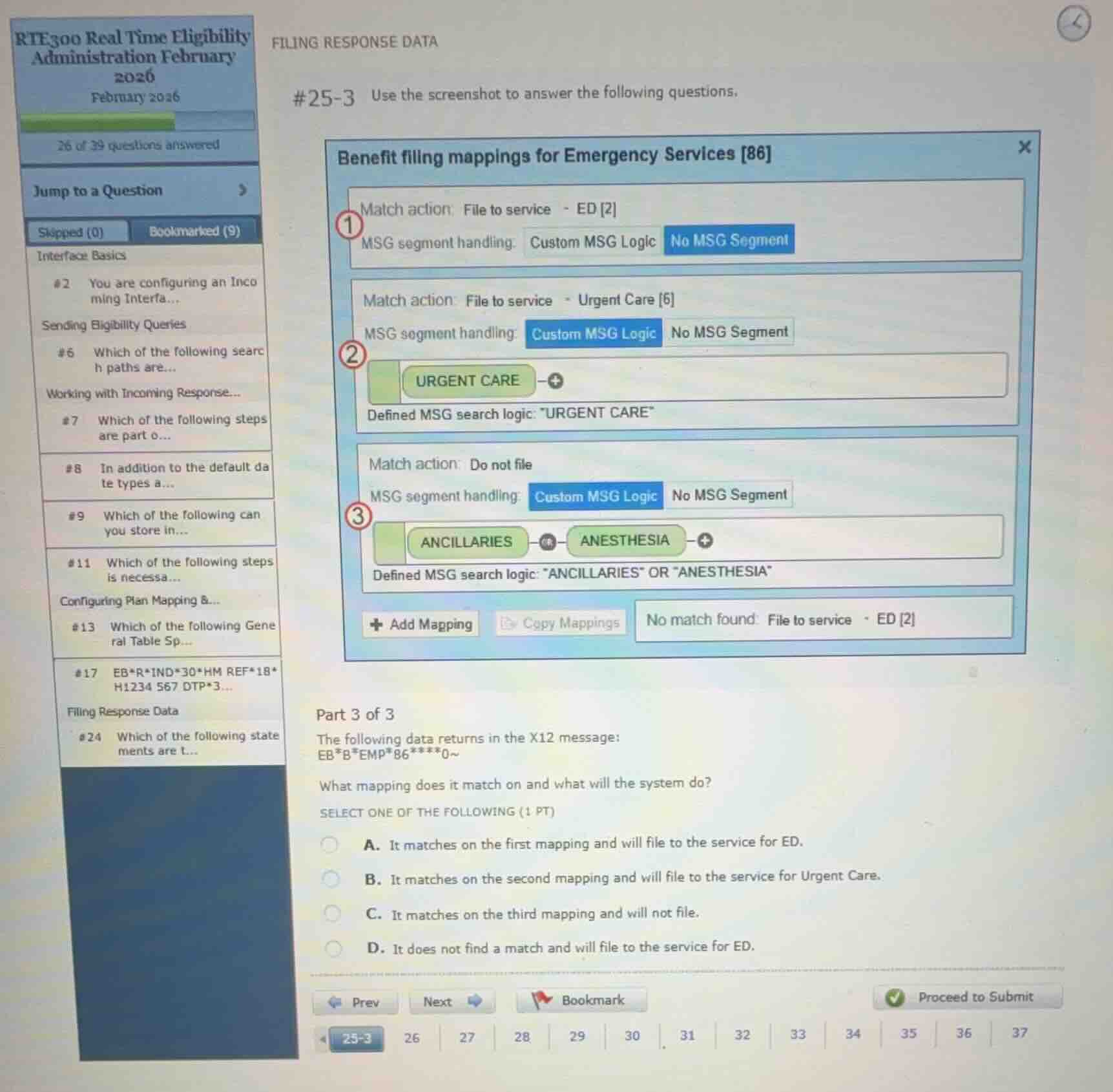
benefit filing mappings for emergency services 86
match action: file to service - ed 2
msg segment handling: custom msg logic | no msg segment
match action: file to service - urgent care 6
msg segment handling: custom msg logic | no msg segment
urgent care
defined msg search logic: \urgent care\
match action: do not file
msg segment handling: custom msg logic | no msg segment
ancillaries or anesthesia
defined msg search logic: \ancillaries\ or \anesthesia\
no match found: file to service - ed 2
part 3 of 3
the following data returns in the x12 message:
ebbemp86***0~
what mapping does it match on and what will the system do?
select one of the following (1 pt)
a. it matches on the first mapping and will file to the service for ed.
b. it matches on the second mapping and will file to the service for urgent care.
c. it matches on the third mapping and will not file.
d. it does not find a match and will file to the service for ed.
Analyze the incoming X12 message segment
The incoming X12 segment is:EBBEMP86***0~
This segment contains:
EBas the segment identifier.86in the EB03 position (Service Type Code), which corresponds to "Emergency Services" as indicated by the window title "Benefit filing mappings for Emergency Services [86]".- No
MSGsegment is present or specified in the incoming data.
Evaluate the configured benefit filing mappings
- Mapping 1:
- Match action: File to service - ED [2]
- MSG segment handling: "No MSG Segment"
- Mapping 2:
- Match action: File to service - Urgent Care [6]
- MSG segment handling: "Custom MSG Logic" (requires "URGENT CARE")
- Mapping 3:
- Match action: Do not file
- MSG segment handling: "Custom MSG Logic" (requires "ANCILLARIES" or "ANESTHESIA")
Determine the matching mapping
Since the incoming message does not contain an MSG segment, it matches the first mapping, which is configured for "No MSG Segment". Therefore, it will file to the service for ED.

Snap & solve any problem in the app
Get step-by-step solutions on Sovi AI
Photo-based solutions with guided steps
Explore more problems and detailed explanations
- A. It matches the first mapping and will file to the service for ED. (Correct answer)
- B. It matches the second mapping and will file to the service for Urgent Care.
- C. It matches the third mapping and will not file.
- D. It does not find a match and will file to the service for ED.