QUESTION IMAGE
Question
pet records - decoding the message worksheet
when we use codes, we need to know two things: the system that is being used and the meaning of the information itself. that means that when we store something in a computer, we have to organize it so that we know these things for each part of our binary code.
today using the provided information, you will present to work at a pet shelter. this particular business is keeping records of all the different pets available for adoption. each record includes the pets age, name, and an 8x8 image representation of the pet.
grading
each question is worth 1 point.
decode the records
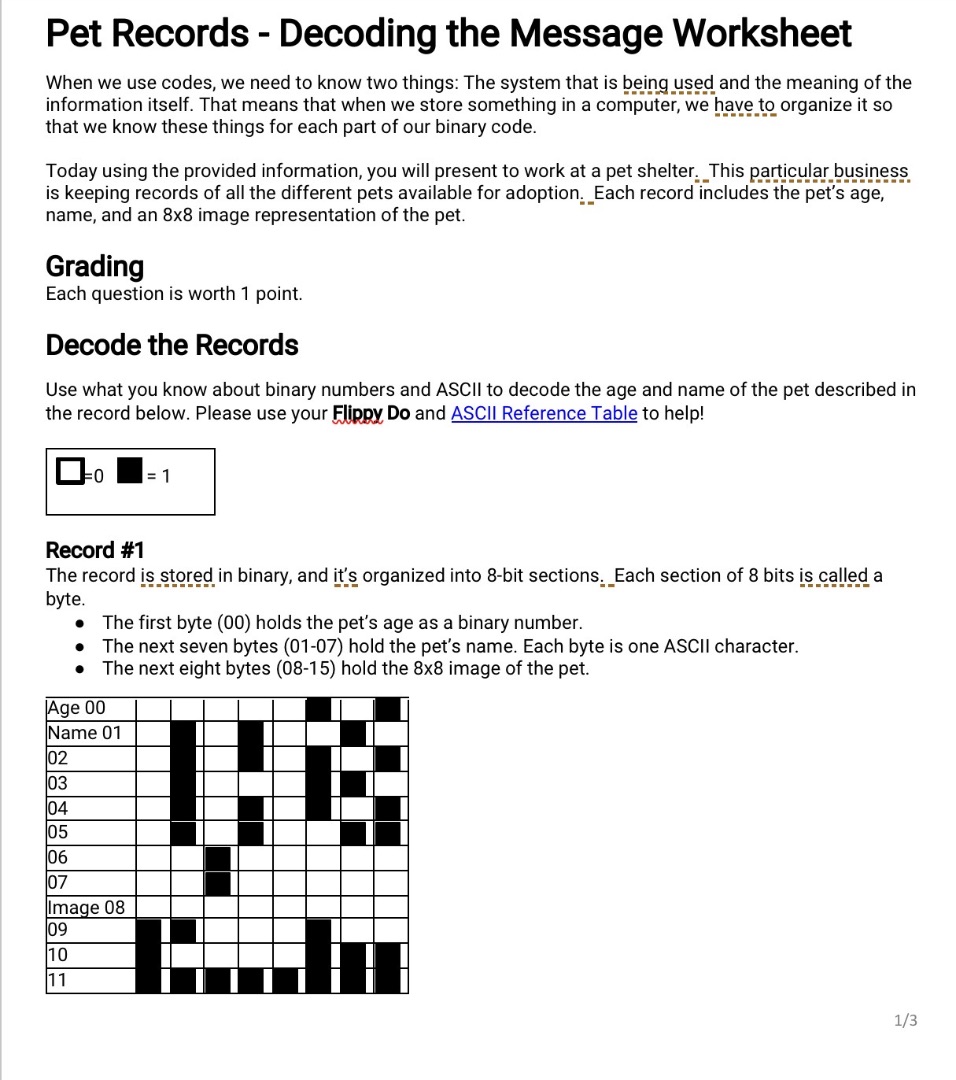
use what you know about binary numbers and ascii to decode the age and name of the pet described in the record below. please use your flippy do and ascii reference table to help!
white square = 0
black square = 1
record #1
the record is stored in binary, and its organized into 8-bit sections. each section of 8 bits is called a byte.
- the first byte (00) holds the pets age as a binary number.
- the next seven bytes (01-07) hold the pets name. each byte is one ascii character.
- the next eight bytes (08-15) hold the 8x8 image of the pet.
🆕 New Concept Discovered: Binary and ASCII Decoding
Converting binary grids (0s and 1s) into numbers and text characters.
Step 1: Understand the Grid Representation
The grid represents binary data where each row is an 8-bit byte.
- A white square represents \(0\).
- A black square represents \(1\).
Let's read the rows from left to right to construct the 8-bit binary strings.
Step 2: Decode the Pet's Age (Byte 00)
Row Age 00 has the following pattern:
- White, White, White, White, White, Black, White, Black
- Binary:
00000101
Convert the binary value 00000101 to a decimal number:
The pet's age is 5.
Step 3: Decode the Pet's Name (Bytes 01 to 07)
Each row from 01 to 07 represents an ASCII character. Let's convert each row's grid pattern into binary, then to decimal, and finally to its corresponding ASCII character.
Byte 01:
- Pattern: White, White, Black, White, White, Black, White, White
- Binary:
01000100 - Decimal: \(64 + 4 = 68\)
- ASCII Character: D
Byte 02:
- Pattern: White, White, Black, White, White, Black, Black, Black
- Binary:
01000111 - Decimal: \(64 + 4 + 2 + 1 = 71\)
- ASCII Character: G
Byte 03:
- Pattern: White, White, Black, White, White, Black, White, White
- Binary:
01000100 - Decimal: \(64 + 4 = 68\)
- ASCII Character: D
Byte 04:
- Pattern: White, White, Black, White, White, Black, White, Black
- Binary:
01000101 - Decimal: \(64 + 4 + 1 = 69\)
- ASCII Character: E
Byte 05:
- Pattern: White, White, Black, White, White, White, Black, White
- Binary:
01000010 - Decimal: \(64 + 2 = 66\)
- ASCII Character: B
Byte 06:
- Pattern: White, White, White, Black, White, White, White, White
- Binary:
00010000 - Decimal: \(16\)
- ASCII Character: Null / Space / Padding (Often used to fill empty character slots in fixed-width records)
Byte 07:
- Pattern: White, White, White, Black, White, White, White, White
- Binary:
00010000 - Decimal: \(16\)
- ASCII Character: Null / Space / Padding
Combining the characters from Bytes 01–05 gives the name DGDEB (or D-G-D-E-B).

Snap & solve any problem in the app
Get step-by-step solutions on Sovi AI
Photo-based solutions with guided steps
Explore more problems and detailed explanations
- Age: 5
- Name: DGDEB