QUESTION IMAGE
Question
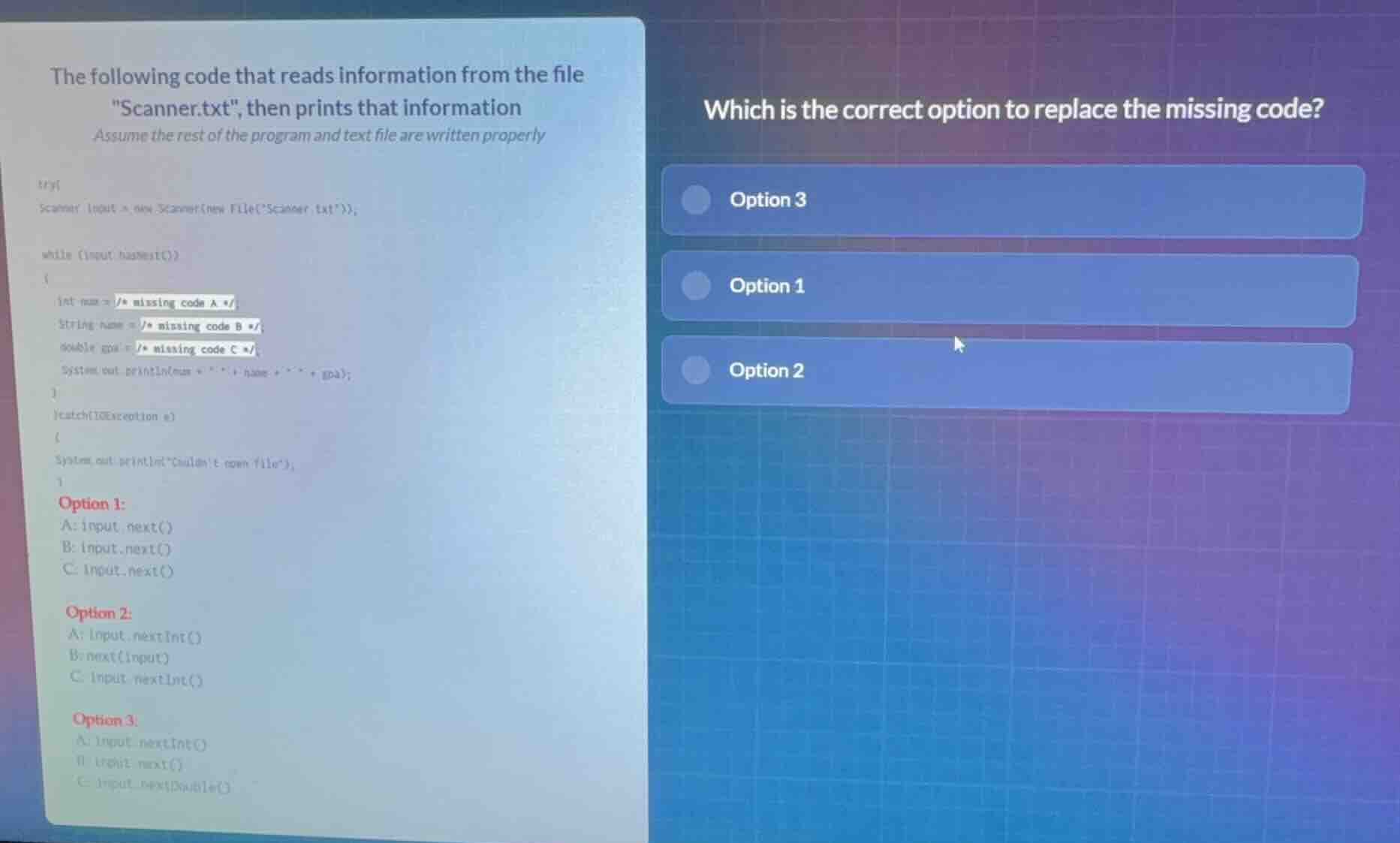
the following code that reads information from the file \scanner.txt\, then prints that information
assume the rest of the program and text file are written properly
try{
scanner input = new scanner(new file(\scanner.txt\));
while (input.hasnext())
{
int num = / missing code a /
string name = / missing code b /
double gpa = / missing code c /
system.out.println(num + \ \ + name + \ \ + gpa);
}
}catch(ioexception e)
{
system.out.println(\couldnt open file\);
}
option 1:
a: input.next()
b: input.next()
c: input.next()
option 2:
a: input.nextint()
b: next(input)
c: input.nextint()
option 3:
a: input.nextint()
b: input.next()
c: input.nextdouble()
which is the correct option to replace the missing code?
- option 3
- option 1
- option 2
🆕 New Concept Discovered: Java Scanner Token Parsing
Reading different data types from a text stream.
Step 1: Analyze the required data types
The code declares three variables with specific data types that need to be populated from the input Scanner object:
int num = / missing code A /;requires an integer value.String name = / missing code B /;requires a text/string value.double gpa = / missing code C /;requires a floating-point decimal value.
Step 2: Match variables with Java Scanner methods
To read these specific types from a Scanner object named input, we use the corresponding Scanner methods:
- For an integer (
int):input.nextInt() - For a string (
String):input.next() - For a decimal (
double):input.nextDouble()
Step 3: Evaluate the options
Let's check the provided options:
- Option 1:
- A:
input.next()(Incorrect: returns a String, but we need anint) - B:
input.next() - C:
input.next()(Incorrect: returns a String, but we need adouble)
- Option 2:
- A:
input.nextInt() - B:
next(input)(Incorrect: invalid syntax for calling a Scanner method) - C:
input.nextInt()(Incorrect: returns anint, but we need adouble)
- Option 3:
- A:
input.nextInt()(Correct: reads anint) - B:
input.next()(Correct: reads aStringtoken) - C:
input.nextDouble()(Correct: reads adouble)

Snap & solve any problem in the app
Get step-by-step solutions on Sovi AI
Photo-based solutions with guided steps
Explore more problems and detailed explanations
Option 3