QUESTION IMAGE
Question
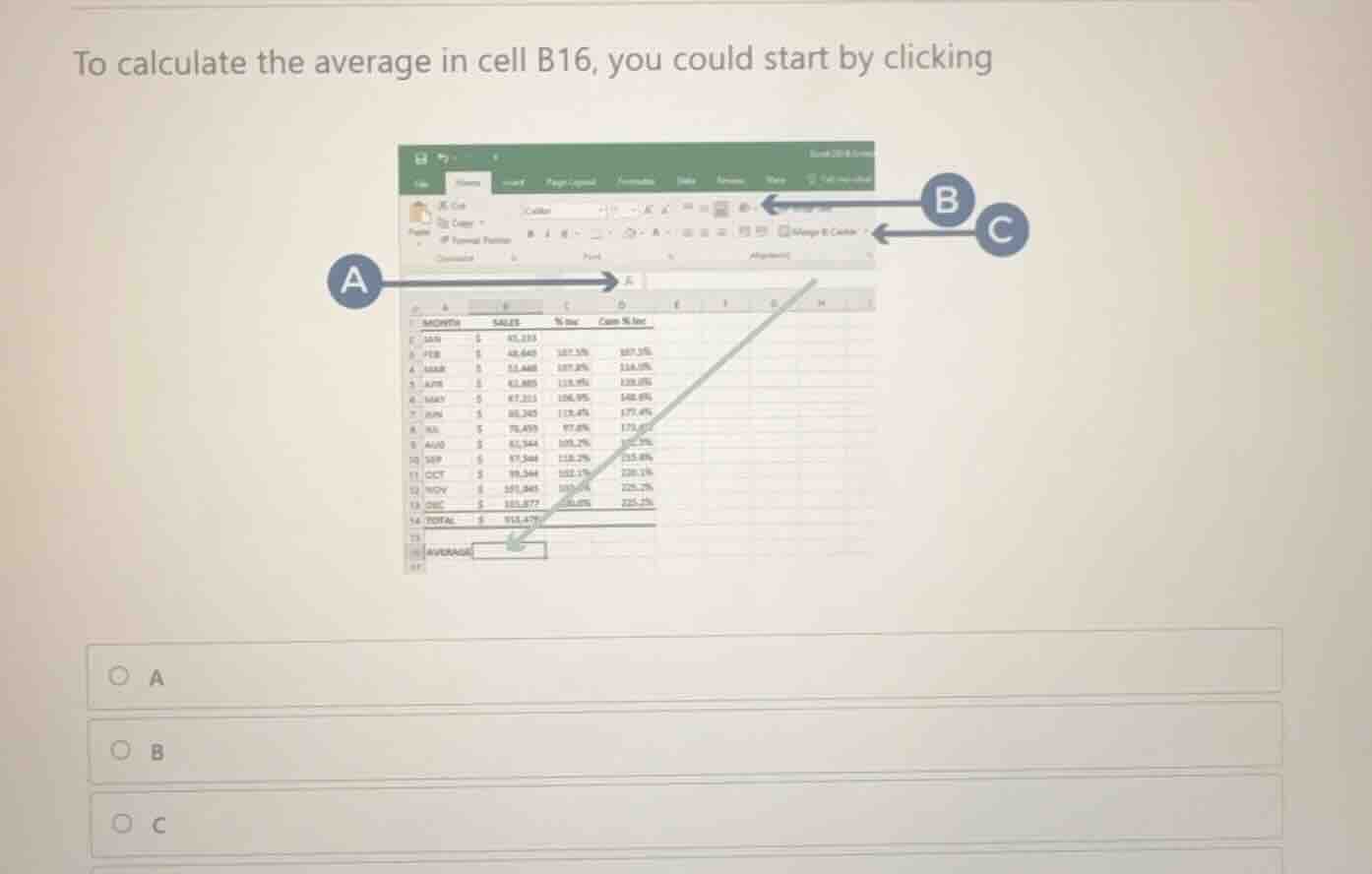
to calculate the average in cell b16, you could start by clicking
a
b
c
Identify the target cell
The question asks how to start calculating the average in cell B16. First, we locate cell B16 in the spreadsheet. Cell B16 is the active cell highlighted with a green border, situated in column B, row 16, next to the label "AVERAGE".
Analyze the labeled interface elements
Let's examine where each arrow points:
- Arrow A points directly to the Formula Bar (specifically the insert function button or the formula input area next to \(f_x\)).
- Arrow B points to the AutoSum dropdown button (\(\Sigma\)) in the Editing group on the Home tab.
- Arrow C points to the active cell B16 itself on the worksheet.
Determine the correct starting action
To enter a formula or calculate a value in a specific cell, the standard first step in Excel Interface Navigation and Spreadsheet Navigation is to select/click the target cell where you want the result to appear. Since we want to calculate the average in cell B16, we must first click on cell B16 to make it active. Arrow C points directly to cell B16.

Snap & solve any problem in the app
Get step-by-step solutions on Sovi AI
Photo-based solutions with guided steps
Explore more problems and detailed explanations
- A
- B
- C (Correct answer)