QUESTION IMAGE
Question
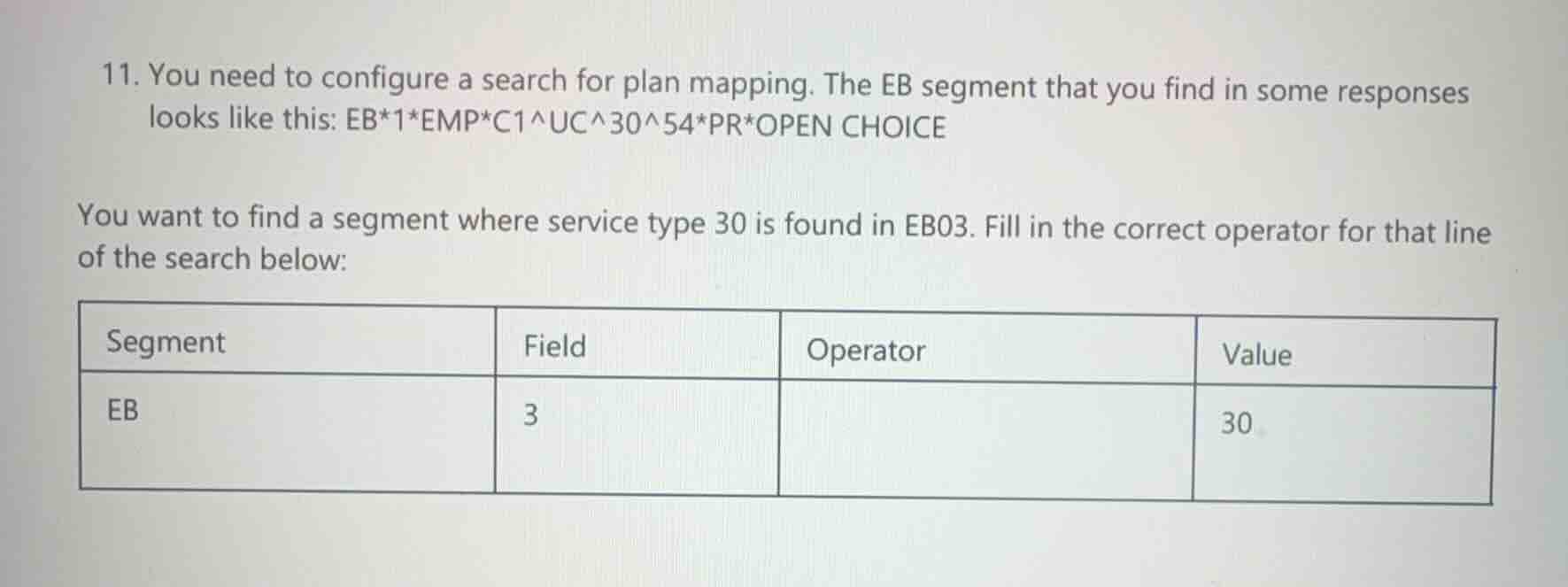
- you need to configure a search for plan mapping. the eb segment that you find in some responses looks like this: eb1empc1^uc^30^54pr*open choice
you want to find a segment where service type 30 is found in eb03. fill in the correct operator for that line of the search below:
\
Analyze the EB segment structure
The provided EB segment is: EB1EMPC1^UC^30^54PR*OPEN CHOICE.
In EDI X12 standards, elements are separated by asterisks (*) and sub-elements (components) are separated by composite delimiters, here represented by carets (^).
Looking at the third element (EB03), its value is C1^UC^30^54. This element contains multiple sub-elements separated by ^.
Determine the correct operator for sub-element matching
Because the target value 30 is one of several sub-elements within the composite field EB03 (C1^UC^30^54), a standard "equals" (=) operator would fail because the entire field value is not exactly 30.
In Epic's Real-Time Eligibility (RTE) and Bridges search configuration, when searching for a specific value within a component/sub-element of a composite field, the contains (or CONTAINS) operator is used to locate the value within the delimited list.

Snap & solve any problem in the app
Get step-by-step solutions on Sovi AI
Photo-based solutions with guided steps
Explore more problems and detailed explanations
You want to find a segment where service type 30 is found in EB03. Fill in the correct operator for that line of the search below:
| Segment | Field | Operator | Value |
|---|