QUESTION IMAGE
Question
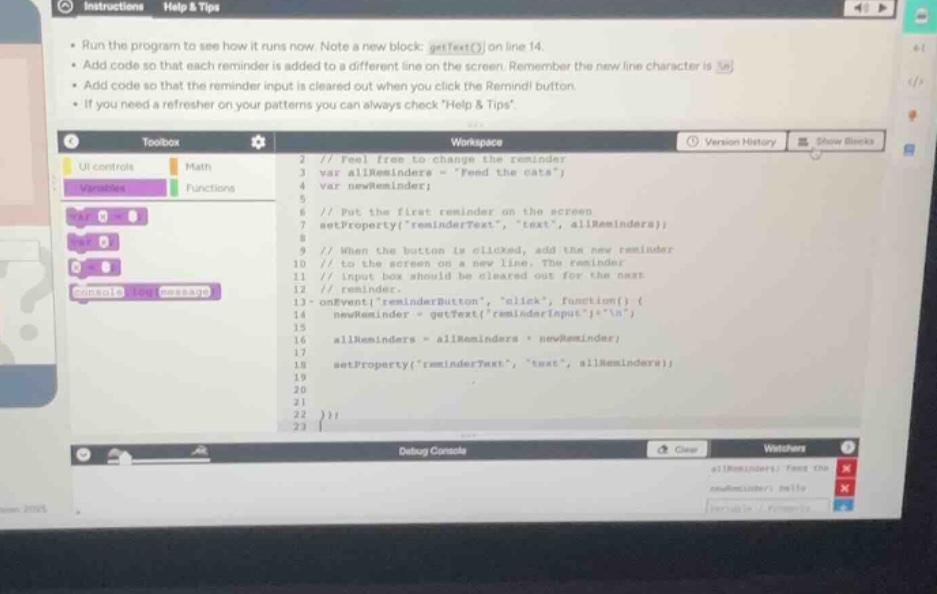
run the program to see how it runs now. note a new block: gettext() on line 14.
add code so that each reminder is added to a different line on the screen. remember the new line character is \
.
add code so that the reminder input is cleared out when you click the remind! button.
if you need a refresher on your patterns you can always check \help & tips\.
workspace:
2 // feel free to change the reminder
3 var allreminders = \feed the cats\;
4 var newreminder;
5
6 // put the first reminder on the screen
7 setproperty(
emindertext\, \text\, allreminders);
8
9 // when the button is clicked, add the new reminder
10 // to the screen on a new line. the reminder
11 // input box should be cleared out for the next
12 // reminder.
13 onevent(
eminderbutton\, \click\, function() {
14 newreminder = gettext(
eminderinput\) + \\
\;
15
16 allreminders = allreminders + newreminder;
17
18 setproperty(
emindertext\, \text\, allreminders);
19
20
21
22 });
Analyze the task requirements
The instructions ask us to:
- Add code so that each reminder is added to a different line on the screen using the newline character `
`.
- Add code so that the reminder input box is cleared out when the "Remind!" button is clicked.
Examine the current code
Looking at the workspace code:
- Line 13:
onEvent("reminderButton", "click", function() { - Line 14: `newReminder = getText("reminderInput") + "
"; (This already appends the newline character
` to the input text).
- Line 16:
allReminders = allReminders + newReminder;(This concatenates the new reminder to the existing list). - Line 18:
setProperty("reminderText", "text", allReminders);(This updates the screen display).
Identify the missing code
The first requirement (adding each reminder to a different line) is already partially handled on line 14 by adding `+ "
"`. However, to ensure the list formats correctly, we must make sure the newline character is placed between reminders.
The second requirement (clearing the input box) is missing. To clear the text input box named "reminderInput", we need to set its text property to an empty string "" inside the click event handler.
Formulate the solution
To clear the input box, we add the following line inside the onEvent block (for example, right after updating the screen on line 18):setText("reminderInput", "");
orsetProperty("reminderInput", "text", "");

Snap & solve any problem in the app
Get step-by-step solutions on Sovi AI
Photo-based solutions with guided steps
Explore more problems and detailed explanations
To complete the requirements for this program, you need to add code inside the onEvent block to clear the input field when the button is clicked.
Add the following line of code directly after line 18 (inside the event handler):
setText("reminderInput", "");Completed Code Block (Lines 13–22):
onEvent("reminderButton", "click", function() {
  newReminder = getText("reminderInput") + "
";

  allReminders = allReminders + newReminder;

  setProperty("reminderText", "text", allReminders);
  setText("reminderInput", ""); // Clears the input box
});