QUESTION IMAGE
Question
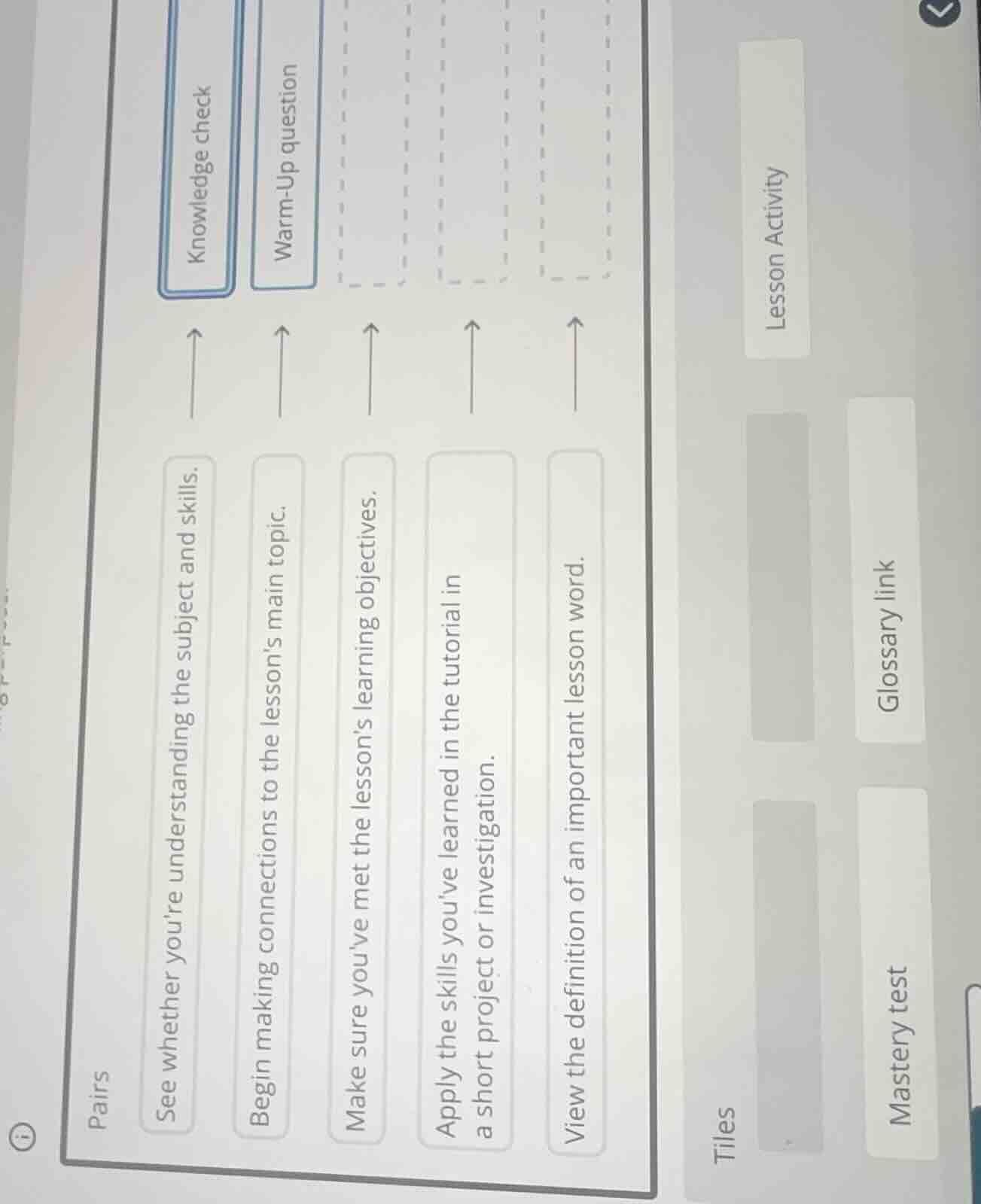
pairs
see whether youre understanding the subject and skills. → knowledge check
begin making connections to the lessons main topic. → warm-up question
make sure youve met the lessons learning objectives. →
apply the skills youve learned in the tutorial in a short project or investigation. →
view the definition of an important lesson word. →
tiles
lesson activity
glossary link
mastery test
<pre_analysis>
{
"quality": "clear",
"question_count": 1,
"skills_matched": [
"direct_cot",
"explain_then_answer",
"tutor"
],
"needs_drawing": false,
"concepts_used": [],
"new_concepts": [
"Instructional Design",
"Educational Terminology"
],
"current_concepts": [
"Instructional Design",
"Educational Terminology"
]
}
</pre_analysis>
<reasoning>
Analyze the matching task
The goal is to match each description on the left with its corresponding educational term (tile) on the right. Let's analyze each description:
- "See whether you're understanding the subject and skills."
- This describes a check of knowledge or mastery. Looking at the available options on the right, "Knowledge check" is already matched to this description in the image.
- "Begin making connections to the lesson's main topic."
- This describes an introductory activity designed to prepare students for the main content. This corresponds to a "Warm-Up question", which is already matched in the image.
- "Make sure you've met the lesson's learning objectives."
- This describes a final assessment to verify if the student has achieved mastery of the objectives. The appropriate term for this is "Mastery test".
- "Apply the skills you've learned in the tutorial in a short project or investigation."
- This describes an active learning task where students practice and apply their skills. The appropriate term for this is "Lesson Activity".
- "View the definition of an important lesson word."
- This describes looking up a term's definition. The appropriate term for this is "Glossary link".
Map descriptions to tiles
Let's align each description with its correct tile:
- "See whether you're understanding the subject and skills." $
ightarrow$ Knowledge check
- "Begin making connections to the lesson's main topic." $
ightarrow$ Warm-Up question
- "Make sure you've met the lesson's learning objectives." $
ightarrow$ Mastery test
- "Apply the skills you've learned in the tutorial in a short project or investigation." $
ightarrow$ Lesson Activity
- "View the definition of an important lesson word." $
ightarrow$ Glossary link
</reasoning>
<answer>
The correct matching pairs are:
- "See whether you're understanding the subject and skills." $
ightarrow$ Knowledge check
- "Begin making connections to the lesson's main topic." $
ightarrow$ Warm-Up question
- "Make sure you've met the lesson's learning objectives." $
ightarrow$ Mastery test
- "Apply the skills you've learned in the tutorial in a short project or investigation." $
ightarrow$ Lesson Activity
- "View the definition of an important lesson word." $
ightarrow$ Glossary link
</answer>
<post_analysis>
{
"subject": "Others",
"question_type": "Free Response",
"knowledge_point": [
"Others",
"Educational Terminology",
"Instructional Design"
]
}
</post_analysis>
Snap & solve any problem in the app
Get step-by-step solutions on Sovi AI
Photo-based solutions with guided steps
Explore more problems and detailed explanations
<pre_analysis>
{
"quality": "clear",
"question_count": 1,
"skills_matched": [
"direct_cot",
"explain_then_answer",
"tutor"
],
"needs_drawing": false,
"concepts_used": [],
"new_concepts": [
"Instructional Design",
"Educational Terminology"
],
"current_concepts": [
"Instructional Design",
"Educational Terminology"
]
}
</pre_analysis>
<reasoning>
Analyze the matching task
The goal is to match each description on the left with its corresponding educational term (tile) on the right. Let's analyze each description:
- "See whether you're understanding the subject and skills."
- This describes a check of knowledge or mastery. Looking at the available options on the right, "Knowledge check" is already matched to this description in the image.
- "Begin making connections to the lesson's main topic."
- This describes an introductory activity designed to prepare students for the main content. This corresponds to a "Warm-Up question", which is already matched in the image.
- "Make sure you've met the lesson's learning objectives."
- This describes a final assessment to verify if the student has achieved mastery of the objectives. The appropriate term for this is "Mastery test".
- "Apply the skills you've learned in the tutorial in a short project or investigation."
- This describes an active learning task where students practice and apply their skills. The appropriate term for this is "Lesson Activity".
- "View the definition of an important lesson word."
- This describes looking up a term's definition. The appropriate term for this is "Glossary link".
Map descriptions to tiles
Let's align each description with its correct tile:
- "See whether you're understanding the subject and skills." $
ightarrow$ Knowledge check
- "Begin making connections to the lesson's main topic." $
ightarrow$ Warm-Up question
- "Make sure you've met the lesson's learning objectives." $
ightarrow$ Mastery test
- "Apply the skills you've learned in the tutorial in a short project or investigation." $
ightarrow$ Lesson Activity
- "View the definition of an important lesson word." $
ightarrow$ Glossary link
</reasoning>
<answer>
The correct matching pairs are:
- "See whether you're understanding the subject and skills." $
ightarrow$ Knowledge check
- "Begin making connections to the lesson's main topic." $
ightarrow$ Warm-Up question
- "Make sure you've met the lesson's learning objectives." $
ightarrow$ Mastery test
- "Apply the skills you've learned in the tutorial in a short project or investigation." $
ightarrow$ Lesson Activity
- "View the definition of an important lesson word." $
ightarrow$ Glossary link
</answer>
<post_analysis>
{
"subject": "Others",
"question_type": "Free Response",
"knowledge_point": [
"Others",
"Educational Terminology",
"Instructional Design"
]
}
</post_analysis>