QUESTION IMAGE
Question
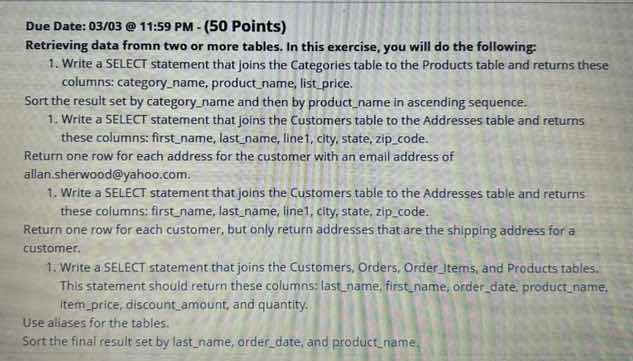
due date: 03/03 @ 11:59 pm - (50 points)
retrieving data fromn two or more tables. in this exercise, you will do the following:
- write a select statement that joins the categories table to the products table and returns these columns: category_name, product_name, list_price.
sort the result set by category_name and then by product_name in ascending sequence.
- write a select statement that joins the customers table to the addresses table and returns these columns: first_name, last_name, line1, city, state, zip_code.
return one row for each address for the customer with an email address of allan.sherwood@yahoo.com.
- write a select statement that joins the customers table to the addresses table and returns these columns: first_name, last_name, line1, city, state, zip_code.
return one row for each customer, but only return addresses that are the shipping address for a customer.
- write a select statement that joins the customers, orders, order_items, and products tables. this statement should return these columns: last_name, first_name, order_date, product_name, item_price, discount_amount, and quantity.
use aliases for the tables.
sort the final result set by last_name, order_date, and product_name.
Join Categories and Products
To retrieve data from both tables, we perform an INNER JOIN on their common key, which is typically category_id. We select the requested columns and sort the results using ORDER BY first by category_name and then by product_name in ascending order.
Join Customers and Addresses by Email
We join the Customers and Addresses tables using their common key, customer_id. To filter the results for a specific customer, we add a WHERE clause matching the email address allan.sherwood@yahoo.com.
Join Customers and Addresses for Shipping
We join the Customers and Addresses tables. To return only the shipping address for each customer, we filter using a condition such as matching the customer's shipping_address_id with the address's address_id in the WHERE or ON clause.
Join Four Tables with Aliases
We join four tables: Customers (c), Orders (o), Order_Items (oi), and Products (p) using their respective relational keys (customer_id, order_id, and product_id). We use table aliases to keep the query clean and sort the final output by last_name, order_date, and product_name.

Snap & solve any problem in the app
Get step-by-step solutions on Sovi AI
Photo-based solutions with guided steps
Explore more problems and detailed explanations
Question 1
SELECT category_name, product_name, list_price
FROM Categories c
JOIN Products p ON c.category_id = p.category_id
ORDER BY category_name ASC, product_name ASC;
Question 2
SELECT first_name, last_name, line1, city, state, zip_code
FROM Customers c
JOIN Addresses a ON c.customer_id = a.customer_id
WHERE c.email_address = 'allan.sherwood@yahoo.com';
Question 3
SELECT first_name, last_name, line1, city, state, zip_code
FROM Customers c
JOIN Addresses a ON c.shipping_address_id = a.address_id;
Question 4
SELECT c.last_name, c.first_name, o.order_date, p.product_name,
       oi.item_price, oi.discount_amount, oi.quantity
FROM Customers c
JOIN Orders o ON c.customer_id = o.customer_id
JOIN Order_Items oi ON o.order_id = oi.order_id
JOIN Products p ON oi.product_id = p.product_id
ORDER BY c.last_name, o.order_date, p.product_name;