QUESTION IMAGE
Question
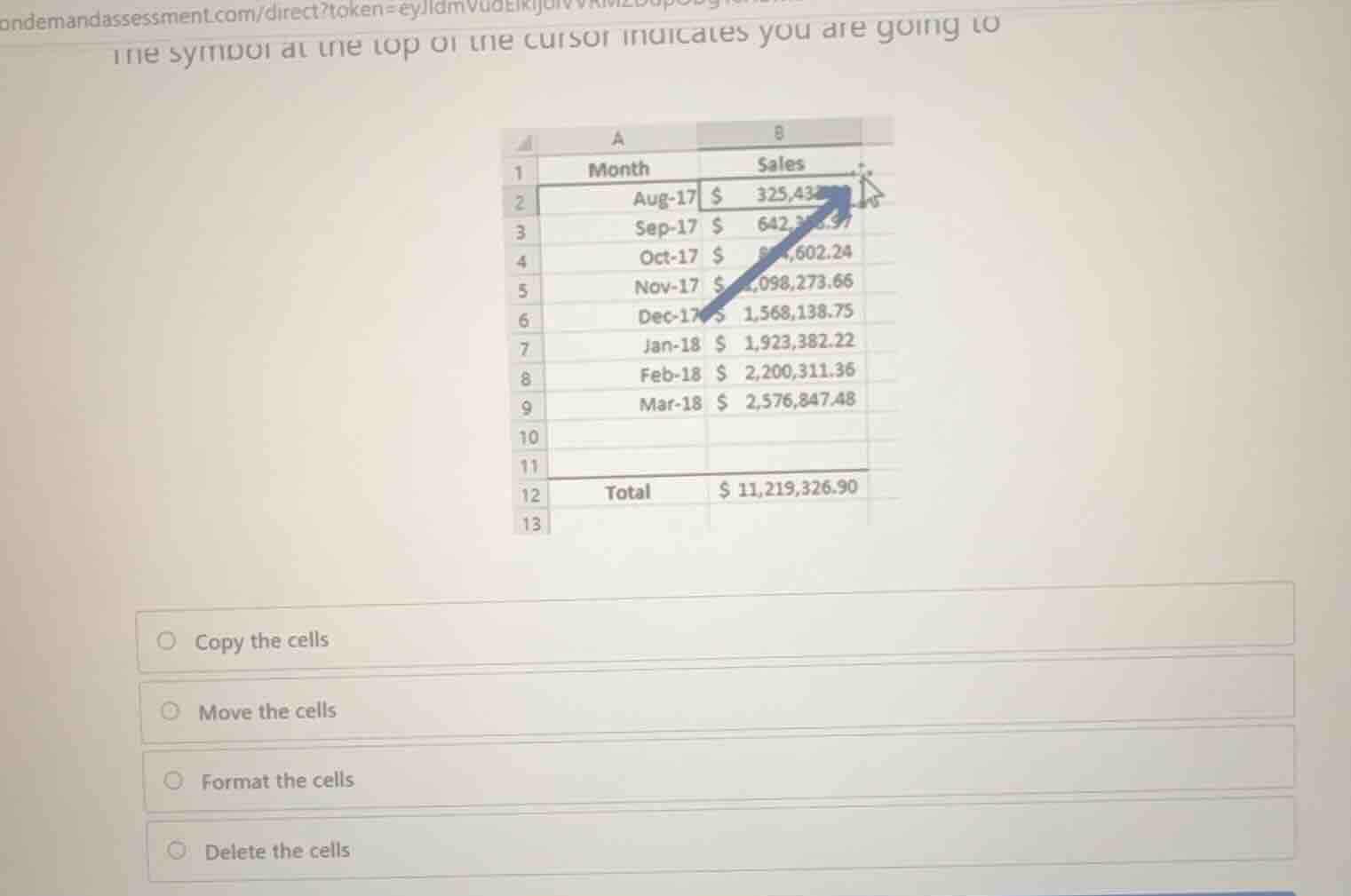
the symbol at the top of the cursor indicates you are going to
copy the cells
move the cells
format the cells
delete the cells
Identify the cursor shape
The question asks what action is indicated by the symbol at the top of the cursor. Looking closely at the image, the cursor is positioned on the border of the selected cell range (indicated by the blue arrow pointing to the border of cell B2). The cursor shape shown is a white arrow pointer with a four-headed move arrow (cross arrows) attached to it.
Determine the corresponding Excel action
In Microsoft Excel, different cursor shapes represent different actions:
- A thick white cross (block plus sign) is used for selecting cells.
- A thin black cross (fill handle) at the bottom-right corner of a selection is used to AutoFill or copy formulas/series.
- An arrow with a four-headed move icon (or just the four-headed arrow/hand icon depending on the OS/version) appears when hovering over the border of a selected range. This cursor indicates that dragging will Move the cells to a new location.
Match with the given options
Let's evaluate the options:
- Copy the cells: Typically indicated by holding
Ctrlwhile dragging (which adds a small plus sign to the cursor) or using the fill handle. - Move the cells: Indicated by hovering over the border of the selection (showing the arrow with four-headed move arrows) and dragging. This matches the cursor shown.
- Format the cells: Not associated with this drag-and-drop cursor.
- Delete the cells: Not associated with this drag-and-drop cursor.
Therefore, the correct action is to move the cells.

Snap & solve any problem in the app
Get step-by-step solutions on Sovi AI
Photo-based solutions with guided steps
Explore more problems and detailed explanations
- Copy the cells
- Move the cells (Correct answer)
- Format the cells
- Delete the cells