QUESTION IMAGE
Question
programming with data files
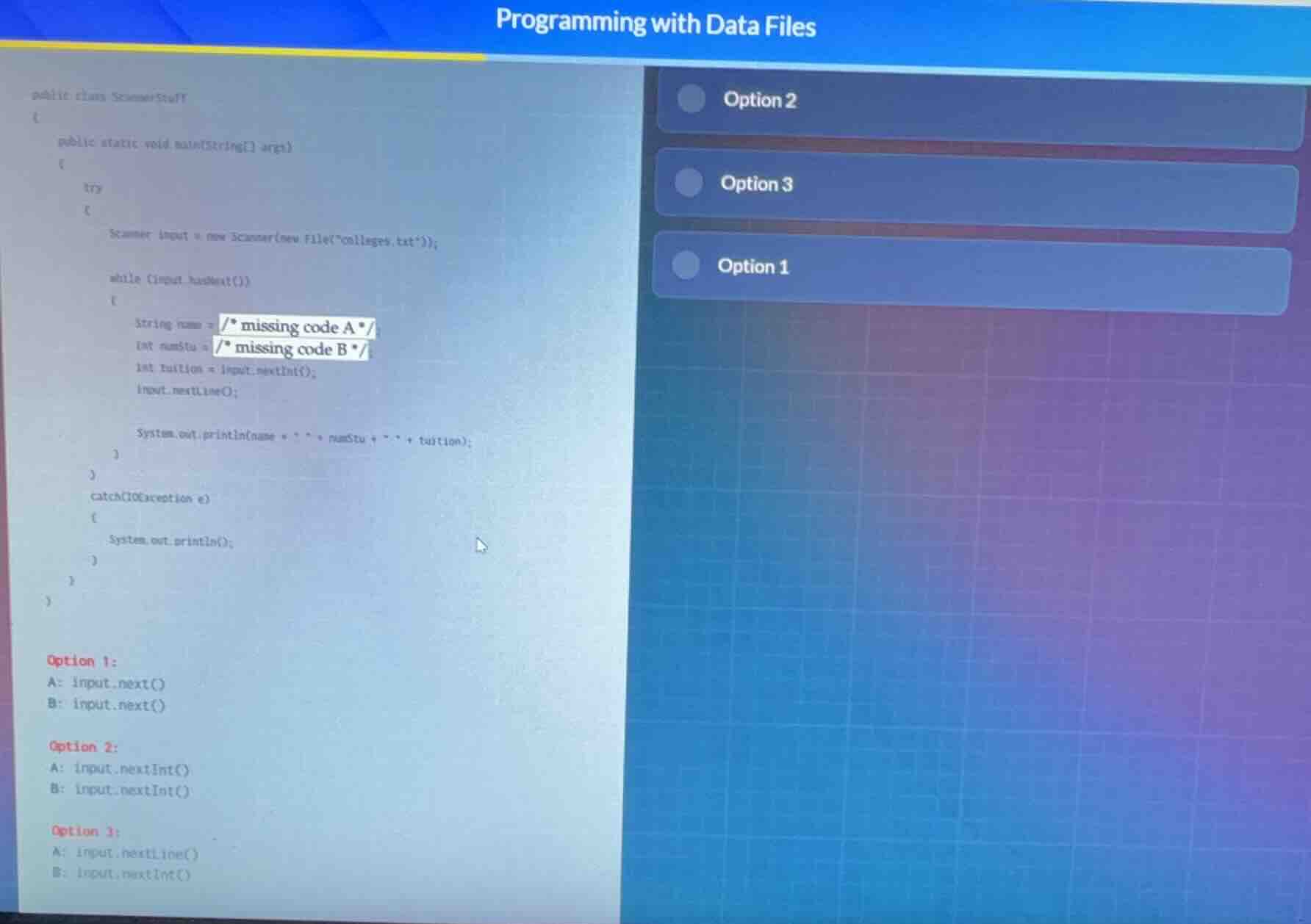
public class scannerstuff
{
public static void main(string args)
{
try
{
scanner input = new scanner(new file(\colleges.txt\));
while (input.hasnext())
{
string name = / missing code a /;
int numstu = / missing code b /;
int tuition = input.nextint();
input.nextline();
system.out.println(name + \ \ + numstu + \ \ + tuition);
}
}
catch(ioexception e)
{
system.out.println();
}
}
}
option 1:
a: input.next()
b: input.next()
option 2:
a: input.nextint()
b: input.nextint()
option 3:
a: input.nextline()
b: input.nextint()
🆕 New Concept Discovered: Java Scanner Token Parsing
Reading text and numeric data sequentially from a file.
Step 1: Analyze the Variable Types
We need to fill in the missing code for two variables:
String name = / missing code A /int numStu = / missing code B /
The third variable is already provided:int tuition = input.nextInt();
Step 2: Determine the Correct Scanner Methods
- For
name(String): We need to read a text value. The standardScannermethod to read the next single-word string token isinput.next(). - For
numStu(int): We need to read an integer value. The standardScannermethod to read the next integer token isinput.nextInt().
Let's look at the options provided in the image:
- Option 1:
- A:
input.next() - B:
input.next()(Incorrect, becausenumStuis declared as anint, so it requires an integer-parsing method likenextInt()).
- Option 2:
- A:
input.nextInt()(Incorrect, becausenameis aString). - B:
input.nextInt()
- Option 3:
- A:
input.nextLine() - B:
input.nextInt()
Since input.next() is not paired with input.nextInt() in any option, let's look closely at Option 3.
If a college name contains spaces (e.g., "State University"), input.nextLine() is used to read the entire line as a String for name. Then, the next line contains the integer numStu, which is read using input.nextInt(). This matches the variable types perfectly:
namegets aStringviainput.nextLine()numStugets anintviainput.nextInt()

Snap & solve any problem in the app
Get step-by-step solutions on Sovi AI
Photo-based solutions with guided steps
Explore more problems and detailed explanations
Option 3