Sovi.AI - AI Math Tutor

Scan to solve math questions

QUESTION IMAGE

how does samantha use design principles in the report to improve its re…

Question

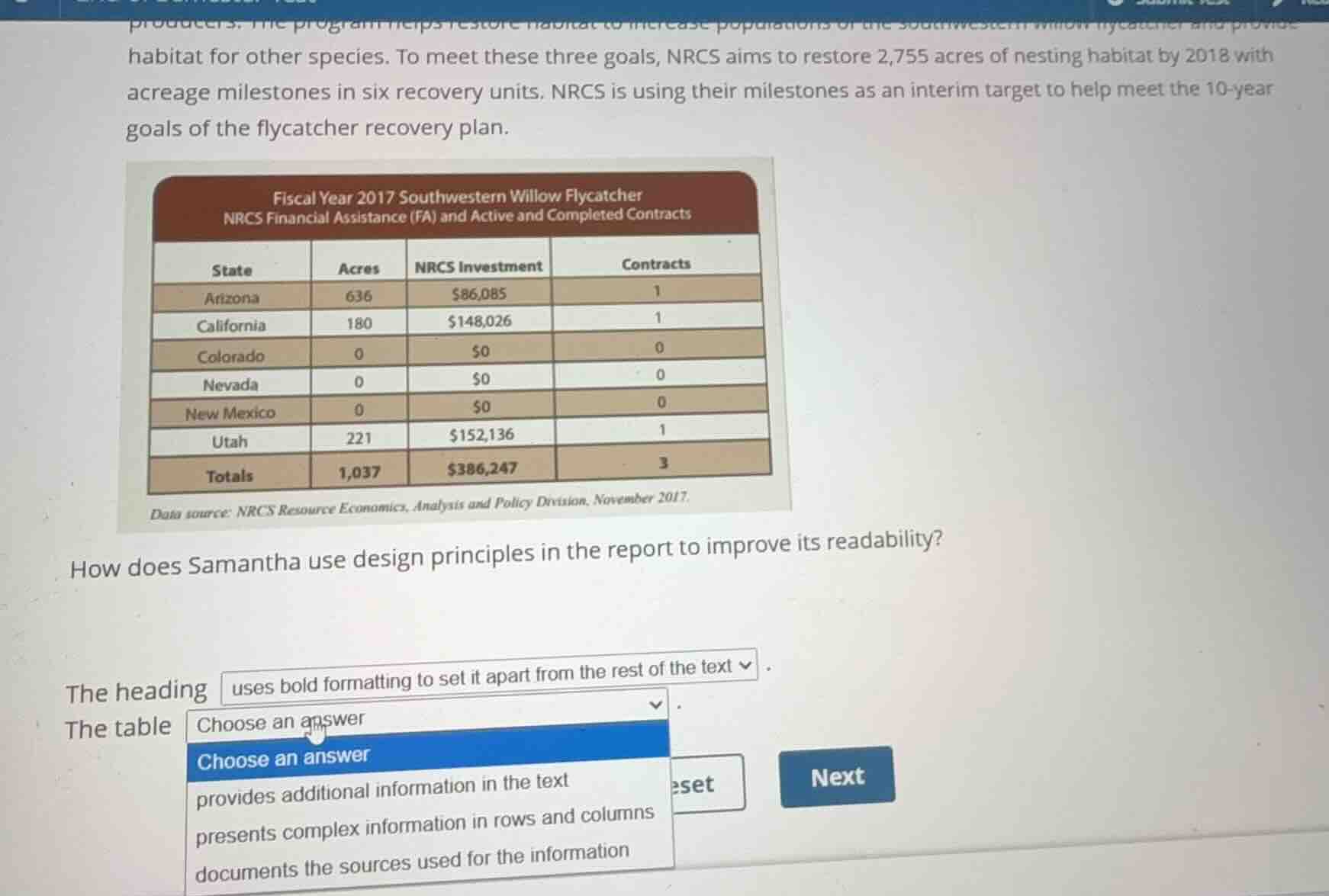
how does samantha use design principles in the report to improve its readability?

the heading uses bold formatting to set it apart from the rest of the text.
the table choose an answer.

  • provides additional information in the text
  • presents complex information in rows and columns
  • documents the sources used for the information

Explanation:

Response

<pre_analysis>
{
"quality": "clear",
"question_count": 1,
"skills_matched": [
"direct_cot",
"blank_filling_formatter",
"explain_then_answer",
"tutor",
"mastery_adaptive_brevity"
],
"needs_drawing": false,
"concepts_used": [
"Visual Design Principles",
"Document Layout"
],
"new_concepts": [],
"current_concepts": [
"Visual Design Principles",
"Document Layout"
]
}
</pre_analysis>

<reasoning>

Analyze the design purpose of the heading

Using the Visual Design Principles knowledge point
The heading "Fiscal Year 2017 Southwestern Willow Flycatcher..." uses bold formatting and a distinct background color block to set it apart visually from the rest of the text, establishing a clear visual hierarchy.

Analyze the design purpose of the table

Using the Document Layout knowledge point
A table is structured specifically to organize and display data systematically. By arranging the states, acres, investments, and contracts into structured rows and columns, it presents complex numerical information in an easy-to-read, structured format.

Select the correct dropdown option

Using the Visual Design Principles and Document Layout knowledge points
The dropdown options for the second blank are:

  1. "provides additional information in the text"
  2. "presents complex information in rows and columns"
  3. "documents the sources used for the information"

The option "presents complex information in rows and columns" directly describes how a table improves readability.
</reasoning>

<answer>
How does Samantha use design principles in the report to improve its readability?

The heading <blank>uses bold formatting to set it apart from the rest of the text</blank>.
The table <blank>presents complex information in rows and columns</blank>.
</answer>

<post_analysis>
{
"subject": "Others",
"question_type": "Fill-in-the-blank",
"knowledge_point": [
"Others",
"Professional Skills",
"Visual Design Principles"
]
}
</post_analysis>

Answer:

<pre_analysis>
{
"quality": "clear",
"question_count": 1,
"skills_matched": [
"direct_cot",
"blank_filling_formatter",
"explain_then_answer",
"tutor",
"mastery_adaptive_brevity"
],
"needs_drawing": false,
"concepts_used": [
"Visual Design Principles",
"Document Layout"
],
"new_concepts": [],
"current_concepts": [
"Visual Design Principles",
"Document Layout"
]
}
</pre_analysis>

<reasoning>

Analyze the design purpose of the heading

Using the Visual Design Principles knowledge point
The heading "Fiscal Year 2017 Southwestern Willow Flycatcher..." uses bold formatting and a distinct background color block to set it apart visually from the rest of the text, establishing a clear visual hierarchy.

Analyze the design purpose of the table

Using the Document Layout knowledge point
A table is structured specifically to organize and display data systematically. By arranging the states, acres, investments, and contracts into structured rows and columns, it presents complex numerical information in an easy-to-read, structured format.

Select the correct dropdown option

Using the Visual Design Principles and Document Layout knowledge points
The dropdown options for the second blank are:

  1. "provides additional information in the text"
  2. "presents complex information in rows and columns"
  3. "documents the sources used for the information"

The option "presents complex information in rows and columns" directly describes how a table improves readability.
</reasoning>

<answer>
How does Samantha use design principles in the report to improve its readability?

The heading <blank>uses bold formatting to set it apart from the rest of the text</blank>.
The table <blank>presents complex information in rows and columns</blank>.
</answer>

<post_analysis>
{
"subject": "Others",
"question_type": "Fill-in-the-blank",
"knowledge_point": [
"Others",
"Professional Skills",
"Visual Design Principles"
]
}
</post_analysis>