QUESTION IMAGE
Question
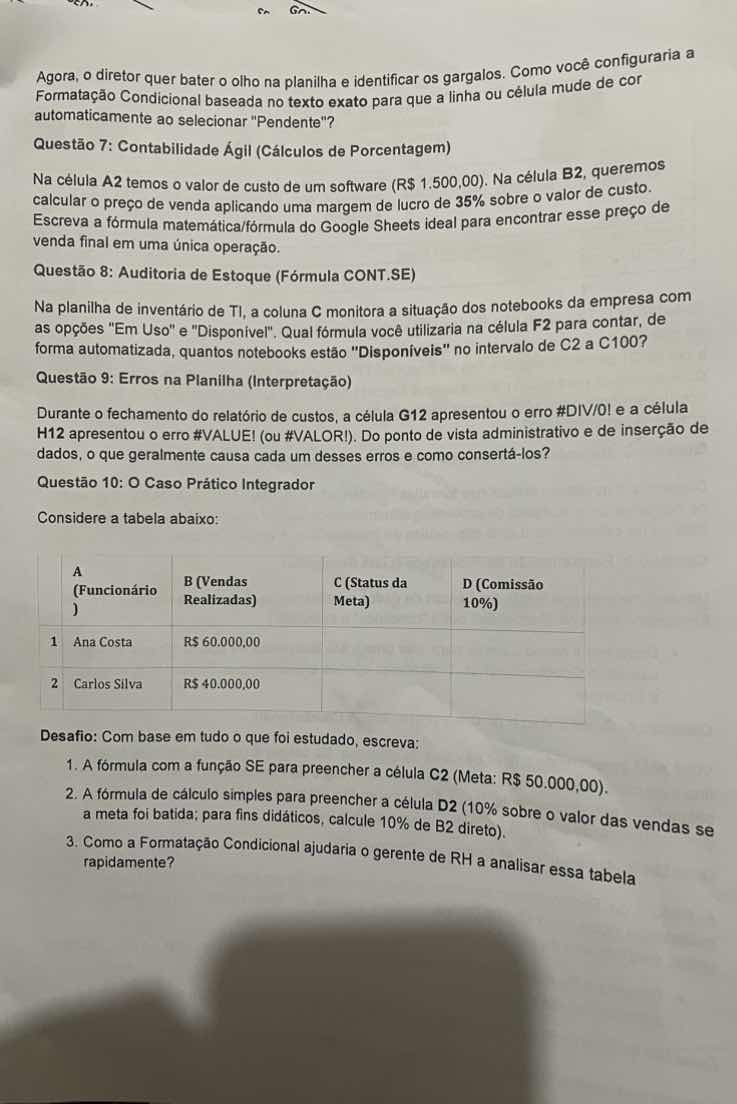
agora, o diretor quer bater o olho na planilha e identificar os gargalos. como você configuraria a formatação condicional baseada no texto exato para que a linha ou célula mude de cor automaticamente ao selecionar \pendente\?
questão 7: contabilidade ágil (cálculos de porcentagem)
na célula a2 temos o valor de custo de um software (r$ 1.500,00). na célula b2, queremos calcular o preço de venda aplicando uma margem de lucro de 35% sobre o valor de custo. escreva a fórmula matemática/fórmula do google sheets ideal para encontrar esse preço de venda final em uma única operação.
questão 8: auditoria de estoque (fórmula cont.se)
na planilha de inventário de ti, a coluna c monitora a situação dos notebooks da empresa com as opções \em uso\ e \disponível\. qual fórmula você utilizaria na célula f2 para contar, de forma automatizada, quantos notebooks estão \disponíveis\ no intervalo de c2 a c100?
questão 9: erros na planilha (interpretação)
durante o fechamento do relatório de custos, a célula g12 apresentou o erro #div/0! e a célula h12 apresentou o erro #value! (ou #valor!). do ponto de vista administrativo e de inserção de dados, o que geralmente causa cada um desses erros e como consertá-los?
questão 10: o caso prático integrador
considere a tabela abaixo:
| a (funcionário) | b (vendas realizadas) | c (status da meta) | d (comissão 10%) |
|---|---|---|---|
| 2 carlos silva | r$ 40.000,00 |
desafio: com base em tudo o que foi estudado, escreva:
- a fórmula com a função se para preencher a célula c2 (meta: r$ 50.000,00).
- a fórmula de cálculo simples para preencher a célula d2 (10% sobre o valor das vendas se a meta foi batida; para fins didáticos, calcule 10% de b2 direto).
- como a formatação condicional ajudaria o gerente de rh a analisar essa tabela rapidamente?
Solve Questão 7
Using the Spreadsheet Formulas and Cell References knowledge points:
- Cost price is in cell
A2(\(R\$\,1.500,00\)). - Profit margin is \(35\%\).
- To calculate the selling price in cell
B2in a single operation, we multiply the cost by \(1 + 0.35\). - The Google Sheets formula is:
Solve Questão 8
Using the Spreadsheet Formulas and Cell References knowledge points:
- We need to count how many times the text "Disponível" appears in the range
C2:C100. - The function to count cells based on a specific criterion is
COUNTIF(orCONT.SEin Portuguese). - The Google Sheets formula in cell
F2is:
- In Portuguese Google Sheets, this is:
Solve Questão 9
Using the Spreadsheet Error Troubleshooting knowledge point:
#DIV/0!error:- Cause: Occurs when a formula tries to divide a number by zero or by an empty cell.
- Fix: Ensure the divisor cell is not empty or zero, or wrap the formula in an
IForIFERRORstatement, such as=IFERROR(A1/B1, 0). #VALUE!(or#VALOR!) error:- Cause: Occurs when a formula contains cells with different data types than expected (e.g., trying to perform mathematical operations on text).
- Fix: Check that all referenced cells contain numeric values, or use functions like
VALUE()to convert text to numbers.
Solve Questão 10 (Desafio 1 & 2)
Using the Logical Functions and Cell References knowledge points:
- Item 1: Formula with
IF(SE) for cellC2(Goal: \(R\$\,50.000,00\)). - If sales in
B2are greater than or equal to \(50000\), the goal is met. - Formula:
=IF(B2 >= 50000, "Meta Batida", "Não Batida")(or in Portuguese:=SE(B2 >= 50000; "Meta Batida"; "Não Batida")). - Item 2: Simple calculation formula for cell
D2(\(10\%\) ofB2directly). - Formula:
=B2 10%or=B2 0.1
Solve Questão 10 (Desafio 3)
Using the Conditional Formatting knowledge point:
- Conditional formatting helps the HR manager visually identify performance instantly.
- For example, cells in column C can automatically turn green if they contain "Meta Batida" and red if they contain "Não Batida".
- This allows the manager to spot high performers and bottlenecks without reading every number.

Snap & solve any problem in the app
Get step-by-step solutions on Sovi AI
Photo-based solutions with guided steps
Explore more problems and detailed explanations
Questão 7
The formula to calculate the selling price in cell B2 is:=A2 * 1.35
---
Questão 8
The formula to count the available notebooks in cell F2 is:=COUNTIF(C2:C100, "Disponível")
(In Portuguese Sheets: =CONT.SE(C2:C100; "Disponível"))
---
Questão 9
- #DIV/0! Error:
- Cause: Division by zero or by an empty cell.
- Fix: Ensure the divisor is not zero, or use
=IFERROR(formula, 0). - #VALUE! Error:
- Cause: A mathematical formula is referencing text instead of numbers.
- Fix: Ensure all referenced cells contain numeric values instead of text.
---
Questão 10: Desafio
- Formula for C2:
=IF(B2 >= 50000, "Meta Batida", "Meta Não Batida")
(In Portuguese Sheets: =SE(B2 >= 50000; "Meta Batida"; "Meta Não Batida"))
- Formula for D2:
=B2 10% (or =B2 0.1)
- Conditional Formatting Benefit:
It allows the HR manager to apply color rules (e.g., green for "Meta Batida" and red for "Meta Não Batida") to instantly identify which employees met their goals and which did not.